ERP software is a business management system that unifies finance, inventory, production, sales, and human resources into a single, centralized platform. Instead of every department running its own spreadsheet or standalone tool, ERP gives the entire company one shared source of truth. In this guide, we cover what ERP software actually is, its core modules, cloud vs. on-premise deployment, and how to choose and implement the right system for your business.
What Is ERP Software?
ERP (Enterprise Resource Planning) software connects a company’s finance, human resources, inventory, production, and sales functions into one integrated system. Before ERP, each department typically relied on its own spreadsheets, standalone programs, or even paper-based processes — accounting in one file, warehouse tracking in another tool, sales in a completely separate system. This fragmentation causes inconsistent data, delayed reporting, and breakdowns in cross-department coordination.
ERP software brings all of these processes onto a single database. A stock movement recorded in the warehouse instantly reflects in finance; an order created by the sales team instantly feeds production planning. This kind of integration has made ERP a strategic management tool not just for e-commerce companies, but for manufacturing, services, and distribution businesses alike.
Core Modules of ERP Software
Most ERP software is built from the following modules, though the exact scope depends on your company’s size and industry:
- Finance & Accounting: General ledger, budgeting, invoicing, e-invoicing/e-ledger processes, and financial reporting.
- Inventory & Warehouse Management: Product and raw material stock tracking, multi-warehouse control, shipping and delivery.
- Production Planning: Work orders, capacity planning, and material requirements planning (MRP).
- Sales & CRM Integration: Order management, quoting, customer relationships, and after-sales follow-up.
- Human Resources: Payroll, leave tracking, performance management.
- Procurement: Supplier management, purchase requests, and approval workflows.
Not every business needs every module — a service company may not need production planning, while an e-commerce business will lean heavily on inventory and logistics modules. The right ERP software should let you combine only the modules your business genuinely needs, without forcing you into a rigid, one-size-fits-all structure.
To make this concrete: when a customer places an order, the sales module creates it; the inventory module instantly checks product availability; the production module triggers a work order if needed; once shipped, the finance module automatically issues the invoice and posts it to accounting. If any link in that chain still runs on a separate, manual system, the whole process slows down and errors multiply.
Concrete Benefits of ERP Software for Your Business
- A single source of truth: Departments stop working from conflicting numbers and instead share the same, up-to-date data.
- Faster decision-making: Managers access real-time, reliable data instead of manually merging reports from different tools.
- Fewer operational errors: Less manual data entry means fewer order, stock, and invoicing mistakes.
- Time savings: Time spent passing information between departments is eliminated by automatic data flow.
- Scalable growth: Adding a new branch, product line, or user happens with far less friction than in a patchwork of disconnected tools.
Cloud ERP vs. On-Premise ERP
One of the first decisions you’ll face when evaluating ERP software is whether it should run in the cloud or on your own servers. The right answer in the cloud ERP vs on-premise ERP debate depends on your budget, IT capacity, and data control requirements.
| Criteria | Cloud ERP | On-Premise ERP |
|---|---|---|
| Upfront Cost | Low (subscription model) | High (hardware + licensing) |
| Deployment Time | Relatively fast | Longer |
| Maintenance & Updates | Managed by the provider | Managed by your own IT team |
| Scalability | Fast and flexible | May require additional hardware investment |
| Data Control | Hosted on provider infrastructure | Fully under your own control |
| Remote Access | Natively supported | May require extra configuration |
The broader market trend is shifting toward cloud ERP, mainly due to lower upfront costs and easier scalability — especially valuable for companies without a large in-house IT team. That said, businesses with strict data residency or regulatory requirements may still find on-premise ERP the more appropriate choice.
Why ERP Software Matters for Small and Mid-Sized Businesses
ERP is often perceived as something only large enterprises need, but in practice, ERP software for small business and mid-sized companies can matter even more. Resources are limited, so a single coordination failure between departments can cause disproportionate time and cost losses. Spreadsheets and disconnected tools that “work fine” at a small scale quickly become unmanageable as the business grows.
A properly sized ERP system lets small and mid-sized businesses manage order processing, inventory, invoicing, and reporting from a single interface — doing more with fewer resources. It also removes, from day one, the scaling problem that manual processes inevitably run into as the company grows.
Because small and mid-sized businesses rarely have a large in-house IT team, how easy an ERP system is to maintain matters just as much as how feature-rich it is. A system that’s simple to run day-to-day often delivers more real-world value than a technically “richer” but harder-to-manage platform.
ERP Software by Company Size
Not every business has the same ERP needs. Small businesses typically look for a system covering basic accounting, inventory, and invoicing — something that deploys quickly and costs less. Mid-sized companies usually need more: production planning, multi-warehouse management, and more advanced reporting, which is where a modular, extensible architecture becomes essential. Large enterprises tend to require multi-branch, multi-currency ERP systems with complex integration needs.
There’s no single “best” ERP software on the market — the right answer depends on matching the system to your company’s scale, industry, and growth trajectory. Deploying an overly complex system in a small business locks resources into managing the software itself; deploying an undersized system in a large company means you’ll likely have to replace it again soon.
How to Choose ERP Software
The question of how to choose ERP software directly affects your business’s long-term efficiency. Key factors to evaluate:
- Run a needs analysis: Clearly identify which processes actually need to be digitized.
- Check industry fit: Do you need a general-purpose ERP, or an industry-specific ERP system software built for your sector?
- Evaluate scalability: Can the system add new modules and users as your business grows?
- Assess integration capability: Will it work smoothly with your existing e-commerce, CRM, or accounting systems?
- Ask about implementation and training support: Does the vendor provide real support for user adoption after go-live?
An ERP selection that skips these criteria often results in an expensive system that ends up underused. Running the selection process alongside experienced ERP consulting support significantly reduces that risk.
The ERP Implementation Process
Buying ERP software is only the starting point. The implementation process typically involves: analyzing your current systems and workflows, designing scenarios that remove existing inefficiencies, configuring and integrating the software to your business’s specific needs, and finally, training and supporting your team until they genuinely adopt the system. Skipping any one of these stages significantly reduces the return on your ERP investment.
ERP Integration with Other Systems
The real value of ERP software often comes not from running it in isolation, but from how well it connects with the other systems your business already relies on. An ERP integrated with a CRM system links a sales quote directly to the order and inventory process, removing duplicate data entry. Similarly, integrating e-invoicing and e-ledger processes into ERP significantly reduces the manual workload of issuing and archiving invoices.
For e-commerce businesses, ERP-to-e-commerce integration is particularly critical: product and stock data flow from ERP to the storefront, while incoming orders flow back from the storefront into ERP in real time. Without this two-way data flow, stock mismatches and delayed order fulfillment become almost unavoidable.
Common Mistakes in ERP Implementation
- Skipping the needs analysis: Buying software before clearly defining actual requirements leads to missing or unnecessary modules.
- Neglecting user training: If the team doesn’t adopt the system, it quickly falls back into old spreadsheet habits and sits unused.
- Over-customization: Ignoring standard workflows in favor of custom-coding every process increases both cost and future upgrade risk.
- Migrating dirty data: Moving inaccurate or incomplete data straight from the old system undermines trust in the new one from day one.
Emerging Trends in ERP Software
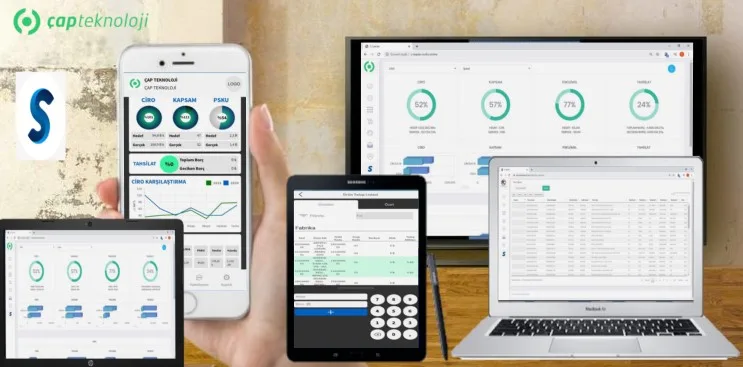
- Mobile ERP: Field staff and managers access real-time dashboards, approvals, and reports directly from mobile devices, regardless of location.
- Social & Collaborative ERP: Built-in messaging and collaboration tools speed up cross-department and vendor communication.
- Two-Tier ERP: A comprehensive Tier-1 ERP runs corporate operations at headquarters, while lighter Tier-2 systems handle local branches or subsidiaries.
- Industry-Specific ERP: Modular solutions built for the specific dynamics of manufacturing, distribution, or other verticals are becoming increasingly common.
Frequently Asked Questions
How long does ERP software implementation take?
It depends on your company’s size, the number of modules being integrated, and how complex your existing data is. A small-scale rollout with few modules can be completed in a few weeks, while multi-department projects with custom integrations can take several months.
What determines the cost of ERP software?
The main cost drivers are the number of users, the modules selected, cloud vs. on-premise deployment, and integration complexity. Rather than relying on a generic figure, the most accurate approach is to get a quote based on an analysis specific to your business.
Do small businesses really need ERP software?
Yes — manual tracking methods (spreadsheets, disconnected tools) become unsustainable as a business grows. A properly sized ERP system lets small businesses operate more efficiently even with limited resources.
What’s the difference between ERP and CRM?
ERP manages a company’s internal resources — finance, inventory, and production. CRM focuses specifically on customer relationships and sales processes. Many modern ERP platforms either include CRM functionality or integrate directly with existing CRM systems.
Is ERP software the same as accounting software?
No. Accounting software only handles financial records. ERP includes accounting but goes far beyond it, unifying inventory, production, sales, and HR processes into a single system.
When do we start seeing ROI from ERP software?
This varies depending on your company’s size and how fragmented your existing processes were. Once user adoption is complete, operational benefits like fewer errors and time savings tend to show up relatively early; more strategic benefits — better decision-making, easier scaling — accumulate gradually as the system matures.
Conclusion: The Right ERP Software Delivers Value Through the Right Implementation
ERP software, when chosen correctly and implemented properly, is a strategic investment that permanently improves your business’s operational efficiency. No matter how powerful the software itself is, skipping the needs analysis, module selection, or team adoption process means a large share of the budget goes underused. That’s why choosing ERP software should be treated not as a one-time purchase, but as a process that reshapes how your business operates long-term.
If you want to choose the right ERP software for your business and get the most out of your investment, learn more about our ERP consulting service or request a free quote.