



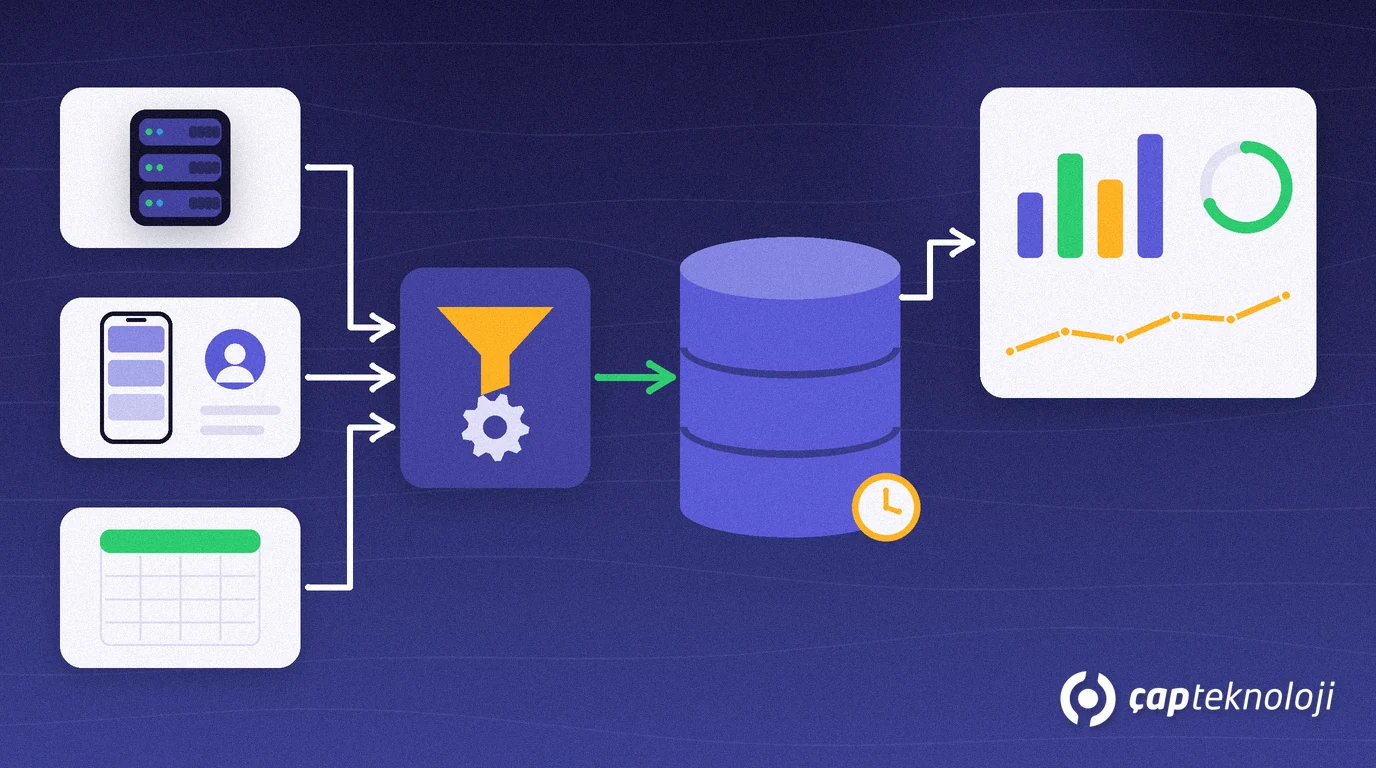
In short: A data warehouse is a central analytics database where data from your ERP, CRM, field sales app and Excel files is cleaned, given shared definitions and stored together with its history. Reports read from it instead of the live ERP database, and everyone gets the same answer for the same metric. For an SME the first step is not a big project but a model that starts with a few critical questions and grows step by step.
In many businesses the sales manager brings one revenue figure to the meeting and finance brings another. Neither is wrong: one deducted returns and the other did not. And because reports run straight against the ERP database, the system slows down at month end. A data warehouse is built to solve both problems at once.
Contents
- What is a data warehouse?
- How it differs from the ERP database
- When do you need one?
- Building it in 6 steps
- ETL or ELT?
- Common mistakes
- Summary and checklist
What is a data warehouse and what is it for?
A data warehouse is a central, read-optimised database in which data from a company’s different systems is modelled for analysis, cleaned and stored together with how it changed over time. Its job is not to record transactions but to answer questions such as “In which region and product group did the margin fall compared with the same period last year?”
According to Microsoft’s guide to online analytical processing (OLAP), databases that hold day-to-day transactions are optimised for individual record entries and are not designed for analysis. Analytical databases are built for heavy reads and few writes, are modelled and cleansed for analysis and often keep history for time-series analysis. The data warehouse sits at the centre of that second world.
Data warehouse vs. the ERP database
| Aspect | ERP database (OLTP) | Data warehouse |
|---|---|---|
| Main job | Record invoices, orders and stock movements | Answer questions and show trends |
| Workload | Many small reads and writes | Few writes, large and complex reads |
| Data model | Normalised, many tables | Star schema of fact and dimension tables |
| Sources | Usually one application | ERP, CRM, field sales and Excel together |
| History | Often the current state only | A record of changes over time |
| Freshness | Real time | Loaded at planned intervals, for example overnight |
The last row matters. The same guide notes that analytical stores are refreshed less often than transactional systems and suit strategic decisions rather than immediate responses. Minute-by-minute stock control is still the ERP’s job.
When does an SME need a data warehouse?
Not every business needs one. If you take a few standard reports from a single ERP, a well-built Power BI model may be enough. If two or more of the following signs apply, it is time to consider a data warehouse seriously:
- Reports slow down the ERP: users complain that screens freeze while month-end reports run.
- Several sources are combined by hand: ERP, CRM, e-commerce and field sales data are matched in Excel every month.
- The same metric gives different numbers: departments define revenue, gross profit or active customer differently.
- History gets lost: when a customer’s region or sales rep changes, old reports change with it.
- A system change is coming: during an ERP upgrade or migration, earlier years must stay available for analysis.
How to build a data warehouse in 6 steps
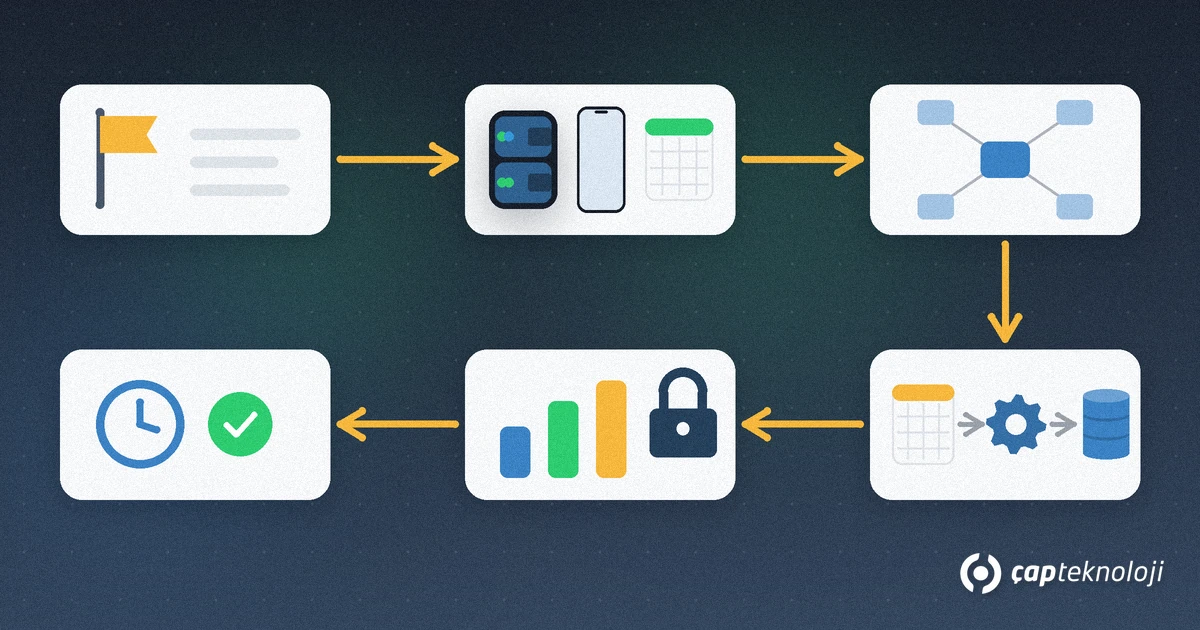
1. Write down the business questions and metric definitions
Before choosing technology, list 10 to 15 critical questions and the metrics that answer them. Is “net sales” the amount after returns and discounts? Finance and sales should approve these definitions together; much of a data warehouse’s value comes from this shared vocabulary.
2. List the sources and their owners
For each question, note which system holds the data, who is responsible for it and how often it needs refreshing. ERP tables, the CRM, the field sales app and manually kept Excel files all belong on this list. Leave any metric with an unclear source out of the first release.
3. Design the model as a star schema
Measurable events such as sales, collections or stock movements go into fact tables; context such as customer, product, date and sales rep goes into dimension tables. Fix the grain of every fact table (for example, one invoice line) from the start. We cover the modelling rules in our Power BI star schema guide.
4. Build the load process (ETL)
Data is extracted from the sources, cleaned in staging tables, deduplicated, validated against rules and loaded into the warehouse. After the first full load, switch to incremental loads that pick up only changed records where possible, and schedule them outside working hours.
5. Prepare the reporting layer and access rights
Your reporting tool should connect to a semantic model with clear field names, relationships and calculations rather than to raw tables. Define who sees which region’s data with row-level security (RLS). If you use Logo, our article on Power BI reports from Logo data covers the connection side.
6. Run, monitor and document it
After every load, reconcile the warehouse with the source system on record counts and totals. Decide who is alerted when a load fails, add the warehouse to your backup plan and keep the metric definitions up to date.
ETL or ELT for loading the data warehouse?
Microsoft’s ETL guide separates the two approaches like this: in ETL, data is transformed in a separate engine before it is loaded into the target; in ELT, raw data is loaded first and transformed using the processing power of the target data store itself.
- ETL can fit: when the target system has limited resources, when business rules are complex, or when you want an auditable staging layer before loading. In on-premises SQL Server environments, SQL Server Integration Services (SSIS) is a common tool for this.
- ELT can fit: when the target is a modern data warehouse or lakehouse that scales on demand and you want to keep raw data for future analyses. Microsoft Fabric is one example of a platform for this approach.
In SMEs the first release often starts as a separate database on the existing SQL Server. Check licensing and hardware capacity first, then evaluate cloud options as needs grow; that is the more controlled path.
Common data warehouse mistakes
- Moving everything at once: copying every table creates a large structure nobody uses. Start with one business area.
- Not writing definitions down: without a shared vocabulary the warehouse just produces different numbers faster.
- Skipping quality checks: a warehouse that is never reconciled with its sources loses trust at the first mismatch.
- Ignoring history: if you do not decide up front how changes to customers and reps are stored, old reports change silently.
- Keeping reports on the ERP: once the warehouse exists, management reports should read from it.
Summary and data warehouse checklist
- Is there a recurring reporting need that combines at least two sources?
- Are the critical metric definitions written down and approved?
- Does every source have an owner and a refresh frequency?
- Is the model designed with fact and dimension tables?
- Is the reconciliation with the sources after each load automated?
- Is report access defined by role, and is the warehouse backed up?
In short, a data warehouse ties company data to a single version of the truth and takes reporting load off the ERP. At ÇAP Teknoloji we can help you decide whether you need a data warehouse or simply a well-built reporting model, and set it up step by step, starting with one business area, as part of our business intelligence consulting. Get in touch.
Frequently Asked Questions
What is the difference between a data warehouse and a database?
Transactional databases such as your ERP are designed for individual record entries: invoices, orders and stock movements. A data warehouse models, cleans and stores data from several sources together with its history, for analysis. One runs the daily business, the other answers questions about it.
Does a small company need a data warehouse?
Not always. If you take a few standard reports from a single ERP, a well-built reporting model may be enough. Consider a data warehouse if you regularly combine several sources by hand, if the same metric differs between departments, or if reports slow down the ERP.
How often is a data warehouse updated?
That depends on your needs; in SMEs a common approach is one load per day outside working hours. Extra loads can be scheduled for metrics that need refreshing during the day. Real-time stock and order tracking should stay in the ERP.
Why build a data warehouse if we already use Power BI?
Power BI is a reporting and visualisation tool; the data warehouse is the clean, consistently defined data layer with history that feeds those reports. As the number of sources and data volume grow, doing the transformation in the warehouse rather than inside Power BI makes reports more consistent and easier to maintain.