



Screens freezing during month-end close, the application not responding when saving an invoice, a “record locked by another user” error… Behind most of these symptoms lie locking problems.
Let’s separate two concepts first, because their fixes are different.
Blocking and deadlock are not the same thing
Blocking: One process waits for a lock released by another process. This is normal — it’s how SQL Server maintains data consistency. The problem is when the wait grows long and cascades. Once the first process finishes, the waiting process continues.
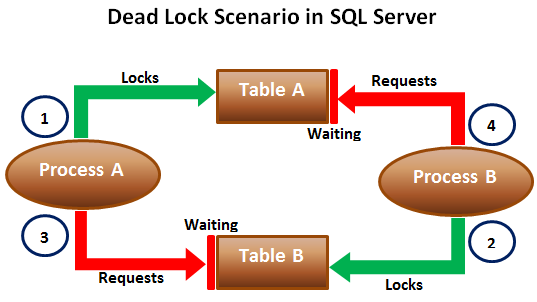
Deadlock: Two processes wait on each other’s locks and neither can proceed. SQL Server detects this and cancels one side as the “victim” (Error 1205). In other words, a deadlock resolves itself, but one transaction fails.
Most user complaints are actually blocking; deadlocks are rarer but more visible.
Seeing the current state
To see who is currently blocking whom:
SELECT
    r.session_id,
    r.blocking_session_id,
    r.wait_type,
    r.wait_time,
    r.wait_resource,
    t.text AS query_text
FROM sys.dm_exec_requests r
CROSS APPLY sys.dm_exec_sql_text(r.sql_handle) t
WHERE r.blocking_session_id <> 0;
For deadlocks, the system_health session in Extended Events stores the most recent deadlock graphs by default — so you can review them retrospectively even after the incident has passed.
Ways to prevent locking issues
1. Keep transactions short
The most common mistake is waiting for user input or running long calculations while a transaction is open. A transaction should only cover the moment of writing to the database; business logic and user interaction should stay outside it.
2. Always access objects in the same order
The classic cause of deadlocks is two different pieces of code touching the same two tables in reverse order. Defining a consistent access order across the application eliminates a large share of deadlocks.
3. Create the right indexes
This is the most overlooked but most effective item. Without a suitable index, SQL Server scans the entire table and locks far more rows than necessary. Adding an index narrows the locked area and directly reduces blocking.
4. Consider READ COMMITTED SNAPSHOT
ALTER DATABASE [DatabaseName] SET READ_COMMITTED_SNAPSHOT ON;With this setting, read operations read a row version of the data instead of waiting on writers. Reader–writer conflicts are largely eliminated. The cost is extra load on tempdb; it can also change application behavior, so it must always be tested in a non-production environment first. If you’re running an off-the-shelf ERP, confirm the vendor supports this setting.
5. Don’t treat NOLOCK as a fix
WITH (NOLOCK) doesn’t wait on locks, but it can read uncommitted (dirty) data, read the same row twice, or skip it entirely. It carries a real risk of producing incorrect figures in a financial report. It doesn’t solve the locking problem — it just hides it. Avoid it anywhere consistency matters.
6. Separate reporting from transactional load
Heavy reports create long-lived shared locks on the live database. A read-only replica or a separate reporting/BI database eliminates a major source of locking issues.
7. Break up bulk operations
A single UPDATE touching millions of rows can trigger lock escalation and lock the entire table. Doing the same work in batches keeps both lock duration and log growth under control.
8. Build retry logic into the application
Reducing deadlocks to zero isn’t realistic in most systems. Automatically retrying a transaction after a short wait when error 1205 occurs resolves the issue without ever showing the user an error.
You can’t manage it without monitoring
Locking issues tend to cluster around specific hours and specific transactions. Setting up alerts for long-running blocking, regularly reviewing deadlock graphs, and logging the most recurring patterns lets you catch the problem before it turns into a complaint.
At ÇAP Teknoloji, we perform locking analysis on SQL Server environments, break down deadlock graphs, and recommend lasting fixes on the application and indexing side. Get in touch if you’re experiencing freezes during your close periods.
Get in touch to learn more about our SQL consulting service or to request a free quote and permanently resolve your database’s locking and performance issues.