




In short: Field sales stock reservation sets inventory aside the moment a rep enters an order. A soft reserve becomes a hard allocate after confirmation and ERP posting, which cuts double-selling the same quantity.
Table of Contents
In distribution, field orders lean on warehouse or van stock. If two reps or an office order hit the same SKU without a lock, one customer promise breaks. Digital transformation in field sales is not only about seeing stock — it is about reserving it at order time.
This guide explains field sales stock reservation, soft vs hard locks, TTL and conflict rules, plus a checklist. Offline cache behaviour is covered in our offline field sales app article; here the focus is the lock itself.
According to IHL Group‘s 2023 inventory distortion research, out-of-stock situations cost retail and distribution worldwide close to 1.2 trillion dollars in lost sales every year. When a promise made in the field has no stock behind it, the loss is not just that order but the customer’s next one.
Why Field Sales Stock Reservation Matters
Without reservation, a stock screen answers “how many are visible?” but not “who already owns this quantity?” That leads to double sales, broken promises, noisy day-end reconciliation and campaign stock burning out unnoticed.
How Reservation Works at Order Time
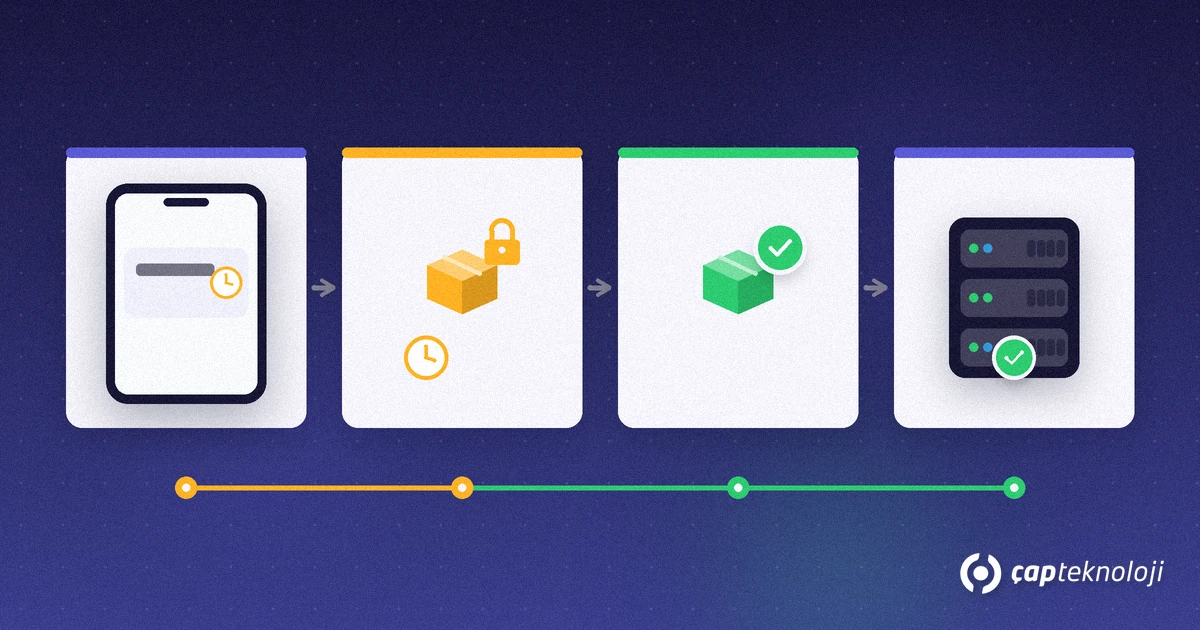
- Capture: The rep enters SKU and qty; the app checks sellable (available) balance.
- Soft reserve: Qty is locked temporarily with a TTL; cancel or expiry frees it.
- Confirm: Credit, discount and customer OK strengthen the reserve.
- Hard allocate + ERP: Central stock drops or the reserve becomes a firm allocation tied to shipment.
Hot selling (van stock) often collapses soft and hard into one step; cold selling keeps soft reserves longer. Ask for these rules when you evaluate field sales automation.
TTL, Priority and Conflicts
- How long does a soft lock live?
- Who wins on conflict — first reserve, segment or route priority?
- Partial fulfil or full reject when stock is short?
- Offline: first-to-sync or timestamp wins?
Treat the stock state machine like secure product design: fail closed on ambiguity (warn instead of over-promising). See OWASP Secure Product Design for the mindset of explicit states and error handling.
Field Sales Stock Reservation Checklist
- Are available / reserved / allocated balances separate on the phone?
- Is soft-reserve TTL documented?
- Does hard allocate reach the ERP without manual re-entry?
- Are van and warehouse reservation layers separated?
- Do conflict and partial-fulfil rules show clear field warnings?
- Can managers age open reserves in a report?
Reservation Metrics and Back-Office
Field sales stock reservation is not only a lock icon on the phone. Managers should watch aging of open reserves, cancel rate and revenue blocked by idle locks. Rising average age usually means TTL is too long or confirmation stalls in the field. A high cancel rate often means reps soft-lock “just in case”. Add these metrics to the field KPI set so the lock stays disciplined.
Campaign SKUs may need shorter TTLs so discounted stock is not trapped on a few stops. The back office should see reserve age by route and intervene. Office and e-commerce channels must share the same reservation pool; otherwise a field lock is pierced from the desk.
Roll-out Steps
Pilot one warehouse or one product family. Start soft-reserve TTL at 15–30 minutes, collect field feedback, then verify soft→hard posting in the ERP. Train reps that available is not the same as promised. Define who can extend, cancel or reverse a hard allocate. After two weeks, measure double-sale complaints and day-end corrections; if they do not fall, tune TTL and warning copy before blaming the concept.
Document the state machine in one page: available → reserved → allocated → shipped/cancelled. Share it with sales, warehouse and IT so arguments use the same words. That glossary is as important as the mobile UI for lasting field sales stock reservation discipline.
Common Mistakes in Stock Reservation
Most projects stumble over missing rules, not missing software. The most common mistake is showing only the stock quantity without a reserve status: the rep assumes the quantity is theirs while an office order is being processed at the same time. The second is unlimited soft reserve with no TTL, so dead reservations lock whole routes. The third is the ERP and the mobile side using different SKU keys: the reserve looks right on screen but posts against the wrong item.
Also avoid silent auto-extensions without a role approval, and never mix van stock and central stock into a single number. A reservation stays credible only when every lock has an owner, an expiry and a visible state. Train planning and field staff together on the same sample data before rolling out nationwide.
Example: One Day in the Field
At 09:10 rep A enters an order for 40 cases of product X; the app places a 24-hour soft reserve on 40 cases and shows the remaining 60 to other reps. At 11:30 rep B asks for 70 cases of the same product; the system reports 60 free and raises an approval request to the regional manager for the missing 10. At 14:00 rep A’s order is approved and posted to the ERP, so the soft reserve becomes a hard allocation and the shipment is tied to that record. By 09:10 the next morning no unapproved reserve remains: expired locks are released automatically and appear in the report as “expired reservations”.
At ÇAP Teknoloji we configure order-time stock control with S-Leader field sales automation. To tighten field sales stock reservation in your operation, contact us.
Frequently Asked Questions
What is field sales stock reservation?
It is setting inventory aside when the field order is entered so another order cannot take the same quantity until the reserve expires or becomes a hard allocation.
Soft reserve vs hard allocate?
Soft reserve is temporary and TTL-based; hard allocate commits the stock in the warehouse/ERP after confirmation.
Does it work offline?
With a local cache and conflict rules, partly yes; the centre reconciles when the device syncs.
Does S-Leader support reservation?
Stock checks at order time and ERP sync can be configured for your hot/cold selling model.
