




In short: A dependable offline field sales app enables sales reps operating along rural routes or low-signal locations to capture orders, check account balances, and monitor stock levels using a secure local cache. When connectivity returns, all locally staged records synchronize bi-directionally with the central ERP system. This architecture eliminates operational dead time, duplicate records, and the risk of lost sales when commercial teams leave coverage zones.
For distributors, wholesalers, and light manufacturing SMBs serving regional markets, sales effectiveness depends on prompt service and dependable data at the customer counter. Yet cellular blackspots remain a daily reality across industrial estates, basement storerooms, logistics loading docks, and remote transit corridors. Relying strictly on online-only web applications means commercial operations stall whenever signals drop.
When an application fails without an active internet connection, field representatives fall back on handwritten notes, phone confirmations, or memory. This disruption leads to out-of-stock commitments, inaccurate promotional pricing, delayed invoicing, and laborious manual re-entry at the end of the shift. Modern route management requires software architectures built specifically to keep running when the network does not.
According to the GSMA State of Mobile Internet Connectivity 2023, about 5% of the world’s population still lives in areas with no mobile broadband coverage, and even inside covered areas, warehouses, basements, industrial zones and rural routes lose signal every day. An app should treat these gaps as the default condition, not the exception.
Why an Offline Field Sales App Is Essential for Regional Routes
For growing enterprises managing wholesale routes across sprawling territories, network volatility is not an edge case; it is standard operating condition. While ad-hoc operations leave disconnected scenarios to chance, companies pursuing field sales digital transformation design their software stacks to withstand physical infrastructure gaps.
Maintaining full order-entry and catalog functionality without internet coverage delivers four key operational advantages for distributors:
- Eliminating Idle Waiting Time: Representatives do not need to pause meetings, restart devices, or walk outside client buildings searching for a cellular signal to generate a quotation.
- Preventing Lost Orders and Clerical Mistakes: Paper notes routinely suffer from misread product codes, transposed quantities, or physical misplacement before reaching the administrative desk.
- Enforcing Credit and Collection Rules: Because current account balances, overdue invoices, and risk caps reside within the device database, staff avoid extending open terms to delinquent accounts while offline.
- Sustaining Professional Customer Experiences: Store managers and purchasing leads receive calculated net discounts, printed delivery receipts, and accurate dispatch promises without delays.
How Store-and-Forward Architecture Operates in Field Sales
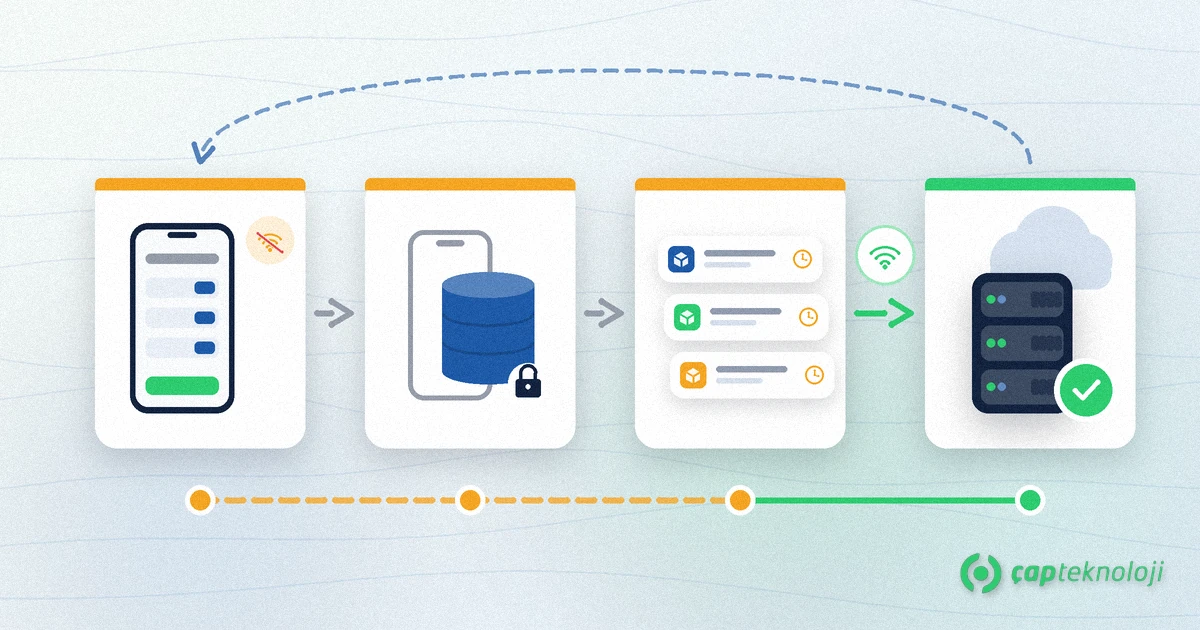
True offline functionality relies on an established software engineering approach known as store-and-forward. Rather than attempting a live API call for every button click, the system treats the mobile device as an autonomous transactional node. The workflow runs through distinct operational phases:
- Morning Master Data Synchronization: Before leaving the depot or home office on high-speed Wi-Fi, the representative launches the application. The system downloads active product masters, tiered price books, credit limits, assigned customer lists, and current warehouse stock counts.
- Local Cache Processing: When serving customers in cellular shadow zones, the application writes entries directly to an embedded local database on the tablet or smartphone. Calculation engines determine taxes, volume discounts, and payment terms locally without network dependencies.
- Transaction Queuing: Every order, payment collection, return slip, and visit note created offline enters an isolated transactional queue marked with local timestamps and sequential document counters.
- Automatic Two-Way Sync: Once the mobile device enters 4G, 5G, or local Wi-Fi coverage, background synchronization services wake automatically. Outbound orders stream into the central system, while revised inventory positions and administrative approvals download back to the device.
Key Evaluation Criteria When Selecting Offline Sales Software
Many mobile tools claim offline support, yet basic caching often falls short during edge cases such as stock shortages or overlapping territory coverage. IT leaders and operations managers should examine the underlying design against several rigorous criteria when evaluating an automated sales workflow.
1. Conflict Resolution Logic
The primary architectural challenge in disconnected operations occurs when multiple representatives sell the remaining units of a constrained product line during the same working morning. The platform must define unambiguous conflict handling rules. Systems typically prioritize the earliest verified transaction timestamp, reserve buffered threshold stocks, or route contested lines to a central supervisor approval queue upon synchronization.
2. Central ERP Integration and Data Continuity
Data gathered on tablets must flow straight into operational back-office platforms without spreadsheet exports or intermediary staging tables. Robust ERP integration ensures that completed sales orders immediately allocate physical warehouse stock, trigger pick lists, or convert directly into dispatch documents without redundant administrative interventions.
3. Device Footprint and Local Performance
Wholesalers managing broad catalogs with tens of thousands of stock-keeping units (SKUs) generate sizable datasets. The application must leverage optimized local database structures, such as indexed SQLite schemas, to deliver instant search responses. High-resolution imagery, technical schematics, and PDF specification sheets should use tiered caching rules so hardware storage and memory stay responsive on standard commercial devices.
4. Data Protection, GDPR, and Local Compliance
Retaining client balances, purchase histories, contact names, and direct signatures on mobile devices presents compliance considerations under data privacy frameworks such as GDPR (alongside KVKK for operations spanning Turkey). The mobile architecture must incorporate database encryption at rest, automated idle timeouts, and remote data-wiping commands executed whenever a lost or stolen asset establishes network contact.
Offline Field Sales App Evaluation Checklist for Commercial Teams
Before standardizing on a software tool for distributed routes, review these essential functional requirements with both your commercial team and technical stakeholders:
- Uninterrupted Offline Functionality: Can reps configure line items, accept signatures, and record visit logs throughout extended offline periods without screen freezes or network warnings?
- Hands-Free Synchronization: Does the system sync data quietly in the background without forcing users to manually trigger bulk uploads at the end of the day?
- Local Safety Stock Indicators: Does the interface issue visible warnings when cached available quantities drop below minimum safety reserve levels?
- Hardware Peripheral Support: Can the application pair via Bluetooth to barcode scanners and portable thermal printers in mobile delivery vans without an internet link?
- Strict Commercial Rule Enforcement: Are custom client pricing tiers, maximum discount thresholds, and credit blocks preserved without degradation while operating off-grid?
The most critical question when taking orders offline is which rule reserves stock once the device reconnects; we explain soft reserve, TTL and conflict rules in our article on field sales stock reservation.
At ÇAP Teknoloji, we engineer enterprise-grade field applications tailored to wholesale distribution, manufacturing, and direct store delivery. Our S-Leader Field Sales Automation platform guarantees continuous commercial performance regardless of network constraints. To audit your field data architecture and streamline route-to-market operations, get in touch with our team via our contact page.
Frequently Asked Questions
How does an offline field sales app keep inventory counts accurate without internet?
The application loads the latest stock figures from your central ERP during the morning sync. As the representative logs orders during the day, the software decrements local counts virtually. Once connectivity returns, two-way sync reconciles local sales against central inventory balances.
What happens if two field reps sell the same limited inventory while offline?
Software conflict resolution rules govern this scenario. Most setups prioritize the earlier local timestamp or flag orders exceeding real-time availability into a central supervisory review queue to prevent double-promising constrained goods.
Is customer information stored locally on sales tablets secure if a device is lost?
Yes, provided the software applies strong database encryption at rest. In compliance with GDPR and relevant regional regulations such as KVKK, central administrators can issue remote-wipe instructions that purge cached databases as soon as the terminal reconnects or after repeated failed passcodes.
Can drivers print dispatch notes or receipts from vehicles while disconnected?
Yes. Pre-allocated document number pools and local document templates allow drivers to print official delivery slips or order confirmations to Bluetooth vehicle printers without needing cellular data. Records update the ERP once a connection is detected.
