



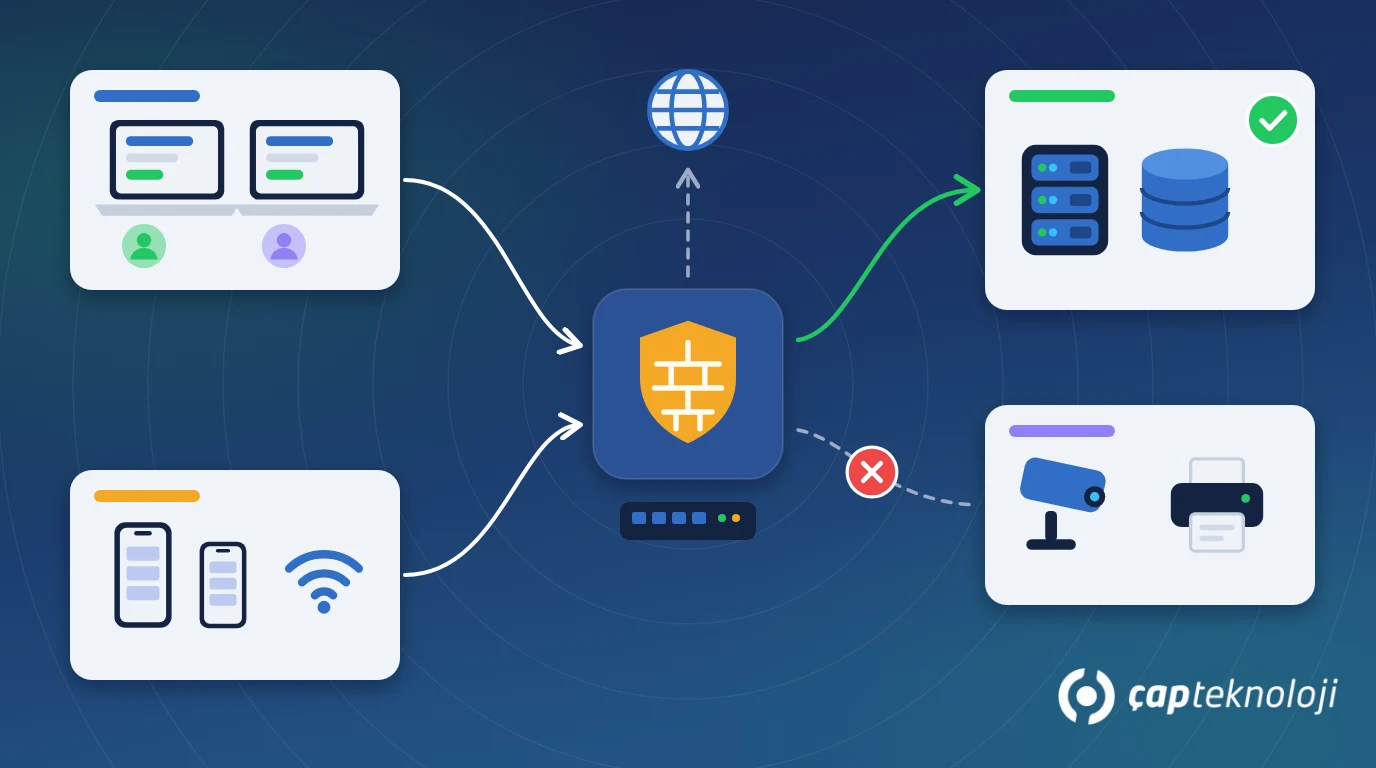
In short: Network segmentation means dividing your company network into separate zones, such as users, servers, guests, cameras and printers, and allowing only the traffic each zone actually needs. In SMEs this is usually done with VLANs and firewall rules. The goal is simple: if one device is compromised, the attack should not spread across the whole network.
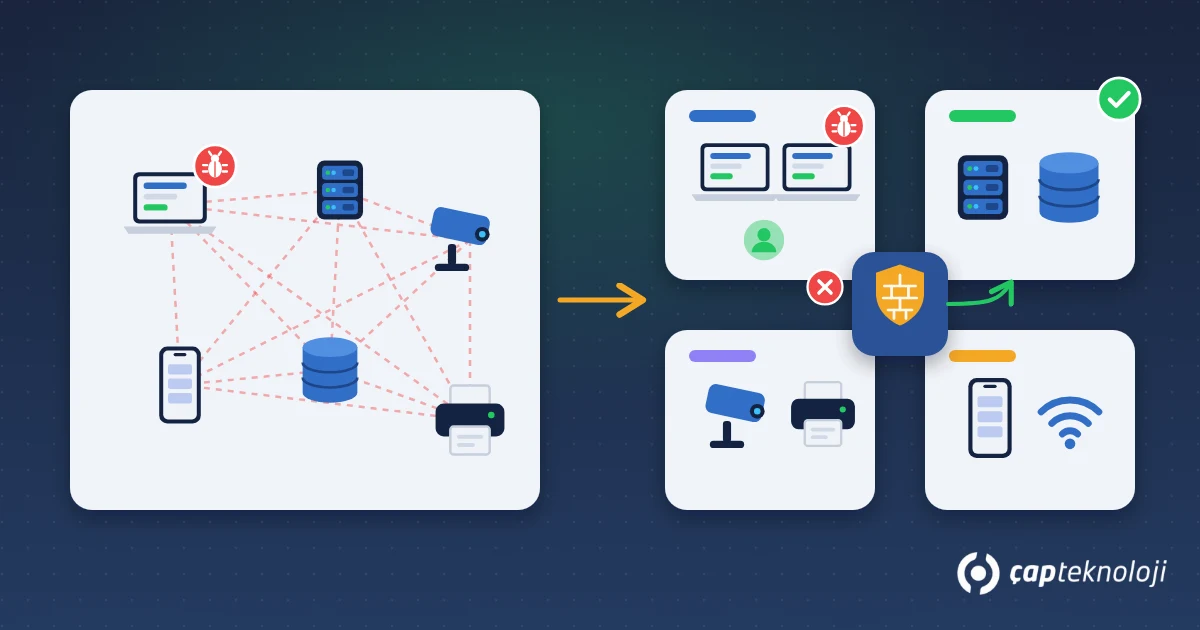
In many SMEs, the accounting PC, the ERP server, the warehouse camera, a visitor’s phone and the smart TV in the meeting room all sit on the same flat network, and they can all see each other. That makes setup easy, but it is expensive when something goes wrong: a single laptop compromised through a phishing email can reach file shares and the database server directly. This is one of the most common reasons ransomware incidents cause so much damage.
Contents
- What is network segmentation?
- Flat network vs. segmented network
- Recommended network zones for SMEs
- VLAN segmentation in 6 steps
- Security, data protection and common mistakes
- Summary and checklist
What is network segmentation?
Network segmentation splits one large network into smaller networks based on purpose and permits only the necessary traffic between them. The split is typically done with VLANs (virtual local area networks): devices connected to the same physical switch are placed in logically separate networks. Traffic between zones is then controlled by rules on the firewall or router.
One point matters more than any other: a VLAN on its own is not a security control. If routing between VLANs allows everything, the network is divided on paper but still flat in practice. The real protection comes from the access rules between zones.
Flat network vs. segmented network: what is the difference?
| Aspect | Flat network | Segmented network |
|---|---|---|
| Can devices see each other? | Yes, all of them | Only permitted zones |
| Impact of a compromised device | Can spread to the whole network | Contained within its zone |
| Guest and IoT devices | Same network as servers | Separate, internet-only network |
| Troubleshooting | Mixed traffic, hard to trace | Traffic visible per zone |
| Setup and maintenance | Simple | Requires planning and rule documentation |
Which network zones are recommended for SMEs?
Every business is different, but the following zones are a good starting point for most SMEs:
- Server zone: ERP server (for example Logo, Türkiye’s widely used ERP), SQL Server, file server and domain controller. Users reach these only on the ports they need.
- User zone: Employee computers. Larger companies may place sensitive departments such as finance or management in a separate zone.
- Management zone: Switches, firewall, wireless access points and server management interfaces. Only the IT team has access.
- IoT and camera zone: IP cameras, recorders, smart TVs, access control and similar devices. These are rarely updated and should be isolated.
- Printer zone: Reachable from the user zone only on printing ports.
- Guest zone: Visitor and personal devices. Internet access only, no access to any internal device.
Do not create zones for their own sake. Five VLANs with clear rules are far safer than twelve VLANs nobody can manage.
How do you segment a network with VLANs in 6 steps?
1. Build an inventory
List every device on the network: servers, PCs, printers, cameras, wireless access points, the phone system and remote access appliances. Record what each one does and who owns it. Devices nobody recognises tend to surface at this stage.
2. Map the traffic you actually need
Work out who needs to reach what. For example, accounting users need the ERP server, warehouse PCs need the handheld terminal server, everyone needs the printers, and cameras only talk to the recorder. This table becomes the basis for your firewall rules.
3. Design zones and the IP plan
Assign each zone a VLAN ID, an IP range and a description, using a readable scheme such as VLAN 10 for servers, VLAN 20 for users and VLAN 30 for printers. Check that your switches and firewall support VLANs and inter-zone rules. Old unmanaged switches will show up here as hardware that needs replacing.
4. Write rules on a “deny by default” basis
Block everything between zones and allow only the traffic identified in step 2. Write rules by port and destination. Broad rules like “user zone to server zone: allow all” cancel out the benefit of segmentation.
5. Migrate in stages
Do not move everything in one night. Start with low-risk zones: guests first, then IoT and cameras, then printers. Separate the server and user zones outside business hours, with a rollback plan. Test critical flows such as the ERP, e-invoicing integrations and backups right after each change.
6. Monitor and document
Watch blocked traffic on the firewall closely in the first weeks. If a blocked request reflects a genuine business need, add a rule. If not, it may point to a misconfiguration or a suspicious device. Document the VLAN list, IP plan and rules together with the reason for each, and review them at least once a year.
Security, data protection and common mistakes
Segmentation supports access restriction at the network level, which is one of the technical measures expected under data protection laws such as GDPR and Türkiye’s KVKK: if only authorised zones can reach servers holding personal data, the impact of a breach is limited. It is not enough on its own, though. Combine it with user permissions, multi-factor authentication and up-to-date backups.
Common mistakes:
- Allowing everything between zones: VLANs exist, but there are no rules.
- Leaving management interfaces in the user zone: anyone can open the switch or firewall admin page.
- Keeping remote access outside the model: a user connecting over VPN can reach the entire network. Remote access should be limited by zone and rule as well. We cover this in our RDP security article.
- Broadcasting a single Wi-Fi SSID: staff and guest devices join the same wireless network.
- Not documenting: when the person who wrote the rules leaves, nobody knows what is open and why.
Summary and checklist
- Is there an up-to-date inventory of every device on the network?
- Are servers, users, guests and IoT devices in separate zones?
- Are inter-zone rules written on a “deny by default” basis?
- Are network device management interfaces open only to IT?
- Do VPN users reach only the systems they need?
- Are the VLAN plan and rules documented and reviewed regularly?
Network segmentation will not stop every attack, but it stops a single mistake from bringing the whole company to a halt. With good planning it can usually be implemented on existing infrastructure with limited investment. As part of our server and network consulting, ÇAP Teknoloji helps with inventory, VLAN and rule design, and a staged migration plan that keeps downtime to a minimum. To assess where you stand today, see our server and network infrastructure checklist.
Frequently Asked Questions
Does a small office need network segmentation?
Even a ten-person office should at least have a guest network and a separation between servers and users. If there are cameras or smart TVs, isolating them is a low-cost, high-impact step.
Do I need new hardware for segmentation?
Usually not, if you already have managed switches and a firewall that supports VLANs. Unmanaged switches may need to be replaced. The inventory step answers this question.
Will segmentation slow down the ERP?
With a properly sized firewall, users will not notice a difference. Very high inter-zone traffic or an underpowered device can add latency, which is why critical applications should be tested after the change.
Is a VLAN the same as a subnet?
No. A VLAN separates the network logically at layer 2 (the switch level), while a subnet is a separation at the IP addressing level. In practice each VLAN is usually given its own subnet and the two are used together.