


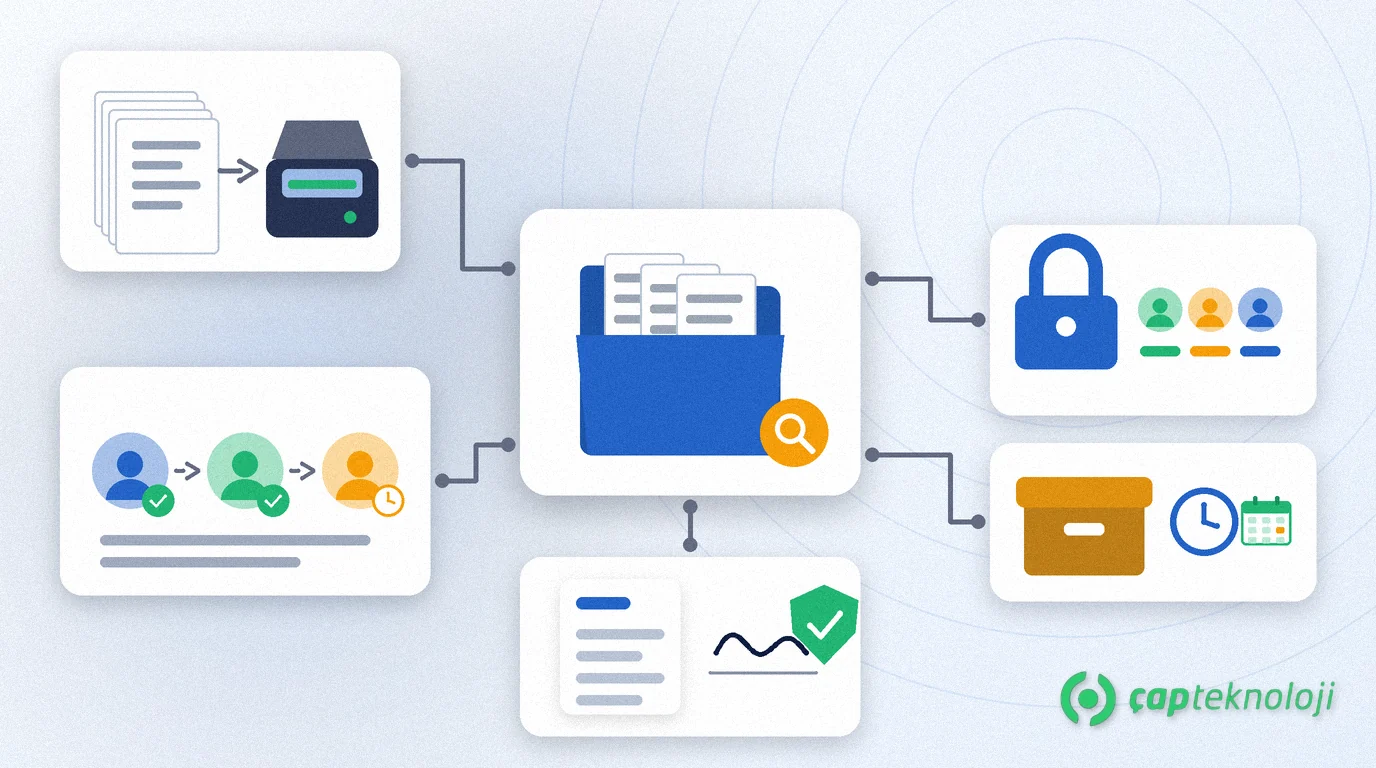
In short: A paperless office is a way of working in which documents are created, approved and stored digitally in one organised archive instead of circulating on paper. For SMEs the right start is not scanning everything, but picking the few documents that circulate most and wait for approvals, and defining a folder structure, approval workflow, permissions and retention rule for them.
A purchase request sits on a manager’s desk, nobody knows which binder holds the signed original of a contract, and three copies of the same invoice live on three different computers. In most companies this does not happen overnight; it builds up over years. This guide explains which documents to start with when moving from paper to digital, the steps involved and the legal and practical points to watch.
Contents
- What is a paperless office?
- Which documents should come first?
- Moving to a paperless office: 6 steps
- Which method for which document?
- Common mistakes
- Summary and checklist
What is a paperless office?
A paperless office is an organisation in which internal documents are created, approved, shared and stored digitally under defined rules rather than on paper.
Two misunderstandings are worth clearing up first. A paperless office is not the same as buying a scanner: scanning a paper document into a folder only produces a digital copy of the paper as long as the process stays the same. And the goal is not zero paper overnight. Some originals must be kept by law; the aim is for day-to-day work to stop depending on paper.
Which documents should come first in a paperless office?
Do not start with the whole archive, start with the documents that slow work down the most. Documents with these traits usually pay off fastest:
- Frequently created documents: purchase requests, expense forms, leave requests.
- Documents that need several approvals: payment orders, quote and discount approvals, contract approvals.
- Documents people search for often: supplier contracts, delivery documents, customer correspondence.
In Turkey most invoices already arrive digitally as e-invoices or e-archive invoices; what is usually missing is a way to approve and find them. For the basics of e-transformation, see our article on e-invoices and e-ledgers.
Moving to a paperless office: 6 steps
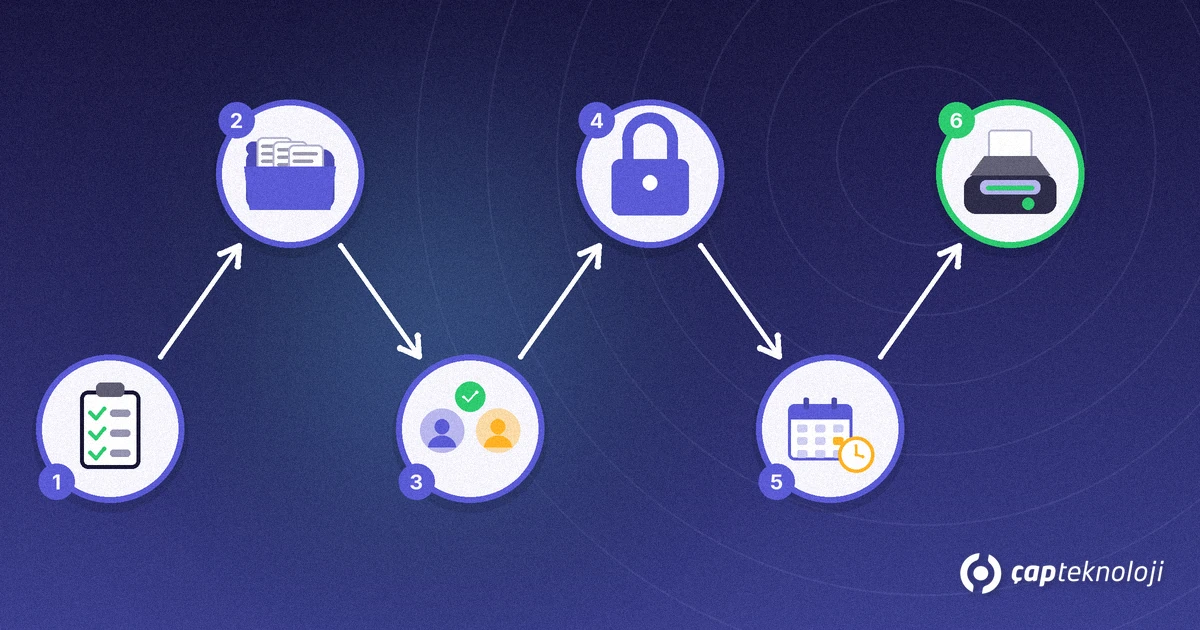
1. Take a document inventory
For each document you have chosen, keep a simple list that answers five questions: who creates it, who approves it, who uses it, where is it stored today and how long must it be kept? This list is the basis for both the approval workflow and the permissions.
2. Choose one storage location and a naming rule
As long as documents are scattered across personal computers, email attachments and shared drives, there is no paperless office. Choose one document repository for the company and structure its folders by department and document type. Write a shared rule for file names, for example date, document type, customer or project name and document number, in that order. Everyone following the same rule is the step that cuts search time the most.
3. Move approval workflows to digital
An approval workflow is the set of rules that defines who a document goes to, in which order and under which conditions. First write down the current paper flow exactly as it is, then remove signatures that add nothing. Define rules such as different approvers by amount, a deputy when the approver is away and a reminder when no answer arrives within a set time.
Workflow types differ between tools, but the logic is similar. Microsoft Learn’s guide to approvals in Power Automate, for example, describes separate types in which everyone must approve, the first response completes the request, or approvers respond one at a time in a fixed sequence. For companies using Logo, we covered approvals inside the ERP in Logo Edge Flow approval workflows.
4. Write down permission and access rules
A digital document is easier to share than paper; that is an advantage and a risk. Grant folder permissions by role, not by person: define separate access groups for purchasing, finance, HR and management. For documents containing personal data, such as personnel files, limit access to those who need it; in Turkey this is also a natural part of the data security obligations under the Personal Data Protection Law (KVKK).
5. Set retention and disposal rules
Put in writing how long each document type is kept and what happens when that period ends. Retention periods depend on the document type and the applicable legislation; agree the periods for commercial and financial documents with your accountant and for documents containing personal data with your data protection adviser. Regular backups of the digital archive belong to this step as well.
6. Stop paper at the point of entry
Paper will keep arriving from outside. Make it a rule that incoming documents are scanned at one point and routed to the right folder and workflow, and decide from the inventory whether the original is kept after scanning. For recurring documents such as supplier invoices and delivery notes, our article on AI document processing shows a possible next step: reading the data automatically instead of typing it in.
Which digital method for which document?
| Document type | Digital method | What to watch |
|---|---|---|
| Purchase request, expense form | Digital form and approval workflow | Approver by amount limit and a deputy rule |
| Incoming supplier invoice | E-invoice or e-archive record linked to an approval workflow | The same invoice must not be processed twice |
| Contract | Secure electronic signature or a scan of the wet-signed original | Transactions requiring an official form cannot be signed electronically |
| Personnel documents | Folder with restricted access | Personal data: only authorised roles may see it |
| Incoming paper mail | Scanning and classification at one point | A rule on whether the original is kept |
For Turkish companies, the basic framework for electronic signatures is Article 5 of Electronic Signature Law No. 5070: a secure electronic signature has the same legal effect as a handwritten signature. The same article excludes legal transactions that the law subjects to an official form or special ceremony, as well as certain guarantee contracts. Agree with your legal adviser which of your contracts fall into which group.
Common paperless office mistakes
- Scanning without changing the process: if the paper flow stays the same, the digital copy is just extra work.
- Every department choosing its own tool: documents stay scattered and searching is no easier.
- No naming rule: file names like “final_v3” make an archive unusable within months.
- Thinking about permissions later: narrowing down a structure where everyone sees every folder is hard.
- Not involving staff: if the new way is not used, paper comes back. The steps in our change management guide apply directly.
Summary and checklist
Moving to a paperless office is less about buying software and more about putting order in place. A short checklist:
- Have you chosen the 3 to 5 documents that circulate and wait for approval most?
- Is it written down who creates, approves and uses each document, where it is stored and for how long?
- Is there one document repository and a shared naming rule?
- Are approval workflows defined with amount limits, deputies and reminders?
- Are permissions granted by role, and are folders with personal data restricted?
- Is there one scanning point and a rule for incoming paper?
ÇAP Teknoloji plans the move of document and approval processes to digital together with your existing ERP and office tools. Find out more on our digital transformation consulting page or get in touch with us.
Frequently Asked Questions
Do I need special software to go paperless?
Not always. Many SMEs can start with the document repository of the office suite they already use and the approval features of their ERP. First define the document inventory, naming rule, approval workflow and permissions; then choose tools by whether they can enforce those rules.
Can I throw away the original after scanning?
It depends on the document type. Some commercial and financial originals must be kept for a statutory period. Record in the inventory, per document type, which originals are kept and agree the periods with your accountant.
Does an electronic signature replace a handwritten one?
Under Turkey’s Electronic Signature Law No. 5070, a secure electronic signature has the same legal effect as a handwritten signature. Transactions the law subjects to an official form or special ceremony, and certain guarantee contracts, cannot be done with a secure electronic signature.
Which department should go paperless first?
Start where documents waiting for approval pile up most. In many companies these are purchase requests, expense forms and payment approvals, because delays there directly affect purchasing and cash flow.