



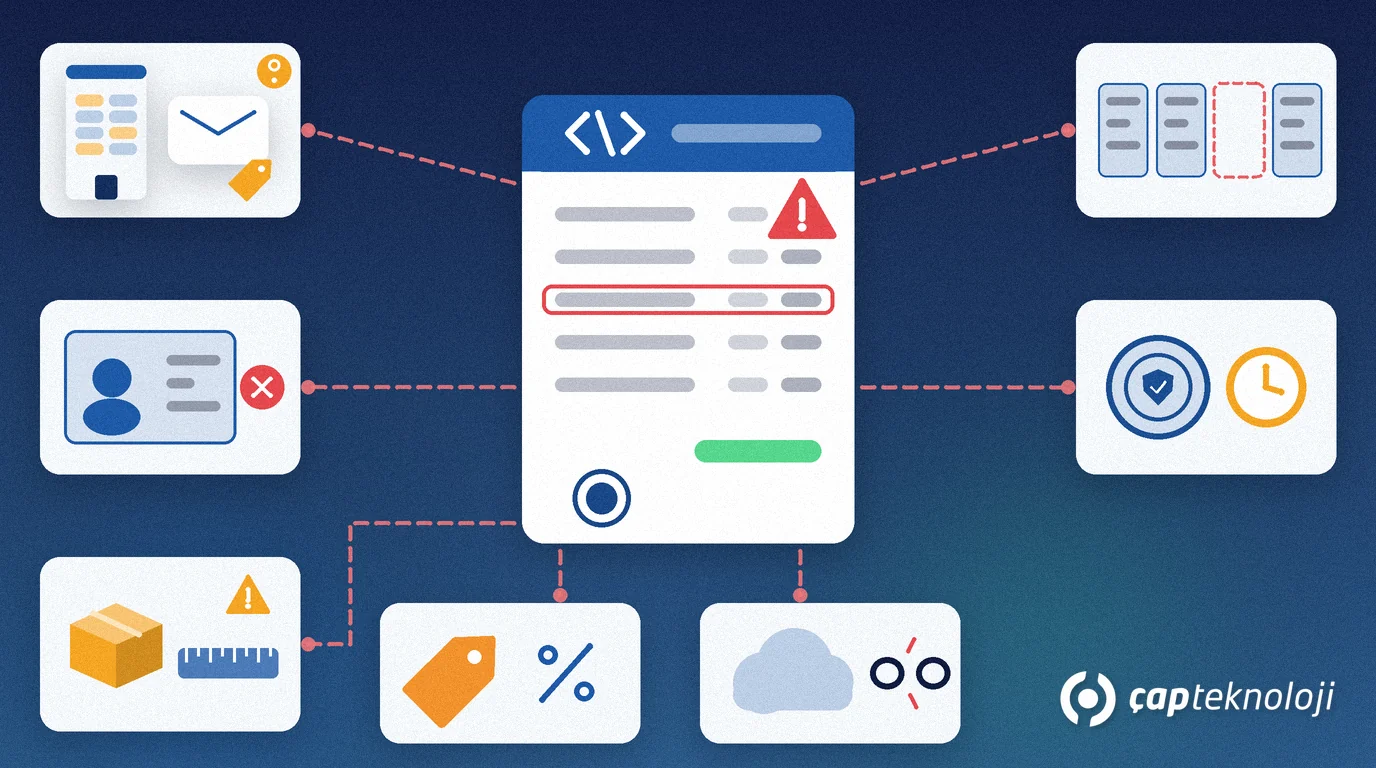
In short: Most Logo e-invoice errors do not come from the invoice itself but from master data: the customer account, stock units, the invoice series and the e-invoice provider connection. To fix them for good, first find out at which stage the message appeared, then correct the source in the master data, and only then send the invoice again.
In companies running Logo Edge T-Series (formerly Logo Tiger 3) or Logo Edge N-Series (formerly Logo Netsis 3), e-invoice errors usually surface at month end, when invoice volume peaks. At ÇAP Teknoloji we work as a Logo partner, and this article collects the 10 errors we see most often in our projects, with their causes and fixes. The goal is that you can make the first diagnosis yourself next time, without waiting for support.
Contents
- Where do Logo e-invoice errors come from?
- The 10 most common errors and their fixes
- Fixing a failed invoice step by step
- From symptom to cause: a quick diagnosis table
- When to ask whom for help
- e-Invoice checklist
- Summary
Where do Logo e-invoice errors come from?
e-Fatura (the Turkish e-invoice) is an invoice prepared in the UBL-TR standard of the Turkish Revenue Administration (GİB) and exchanged electronically only between users registered in the e-Fatura system.
An invoice you create in Logo passes four stops before it reaches the buyer: your Logo product converts it to UBL-TR, in most setups a private integrator (eLogo on the Logo side, or another provider) sends it to GİB in an envelope sealed with the company’s electronic seal (mali mühür), GİB routes it to the buyer’s mailbox, and under the commercial scenario the buyer accepts or rejects it. An error can occur at any of these stops, so the first question is always: at which stage did it happen?
The technical architecture is described in the legislation and guide pages of GİB’s e-Belge website. The FAQ on Logo’s own Logo e-Invoice product page is the basis for several of the fixes below.
Logo e-invoice errors: the 10 most common and their fixes
1. The buyer is not a registered e-Fatura user
e-Fatura is a closed system: you can only send to registered users. Customers who are not registered receive an e-Archive invoice (e-Arşiv Fatura) instead. The reverse also happens: the customer has joined e-Fatura, but their account in Logo is still marked as e-Archive. The fix is to refresh the registered user list in Logo and correct the customer account accordingly.
2. Wrong mailbox alias
Some companies have more than one mailbox alias (posta kutusu etiketi), and the alias changes when they switch provider. If the customer account still holds the old alias, the invoice is routed to the wrong address or rejected. Ask your customer for the current alias in writing and enter it on the account.
3. Wrong tax number, ID number, company name or address
The Turkish tax number (VKN) has 10 digits, the national ID number (TCKN) 11. A space, a missing digit, the wrong tax office or an incomplete address stops the invoice. Making these fields mandatory when a customer account is created cuts the error off at the source.
4. The wrong scenario is selected
Under the basic scenario (temel fatura) the buyer has no rejection right in the system; under the commercial scenario (ticari fatura) the buyer can send an acceptance or rejection. e-Invoices to public bodies are sent under the basic scenario. Define the scenario per customer on the account instead of choosing it by hand for each invoice.
5. Invoice type and VAT exemption code missing
An invoice with zero VAT and no exemption code breaks the rules. According to Logo’s e-invoice FAQ, an invoice that falls under an exemption uses the invoice type İSTİSNA (exemption) with the matching exemption code. A zero-VAT invoice that is not an exemption uses the type SATIŞ (sale) with code 351 “İstisna Olmayan Diğer” (other, non-exempt). Decide with your accountant which code fits your transaction.
6. Units of measure are not mapped
Units on stock cards such as “piece”, “box” or “kg” need a mapping to the UBL-TR code list. If a new unit is used before it is mapped, every invoice that contains it fails. Limit the right to create new stock cards or units to people who know the mapping.
7. Invoice number or series errors
An e-Fatura number has 16 characters: a 3-character series, a 4-digit year and a 9-digit sequence number. If the series is not updated at the start of the year or numbers are typed in by hand, you get collisions and gaps. According to Logo’s FAQ, if a sequence number was skipped by mistake, you explain this to your tax office in a written petition and continue without using the skipped numbers. Plan this step with your accountant.
8. Delivery note details missing
If a delivery note (irsaliye) was issued before the invoice, its number and date must appear on the invoice. This link often breaks in companies where shipping and invoicing are handled by different teams. Create the invoice from the delivery note inside Logo instead of typing it from scratch.
9. Provider connection or electronic seal problem
The e-invoice is sealed with the electronic seal, and Logo connects to the provider with the user details stored in Logo. The case we see most often in our projects: the password was changed in the provider portal, but the connection details in Logo were not updated. Track certificate validity and connection details on a fixed schedule with a named owner.
10. Product version or code lists out of date
GİB updates the e-Fatura packages and the UBL-TR code lists from time to time. If your Logo product and its e-invoice components are not up to date, they may produce documents that break a new rule. Follow the e-Belge announcements, test updates in a test environment first, then roll them out to production.
Fixing a failed invoice step by step
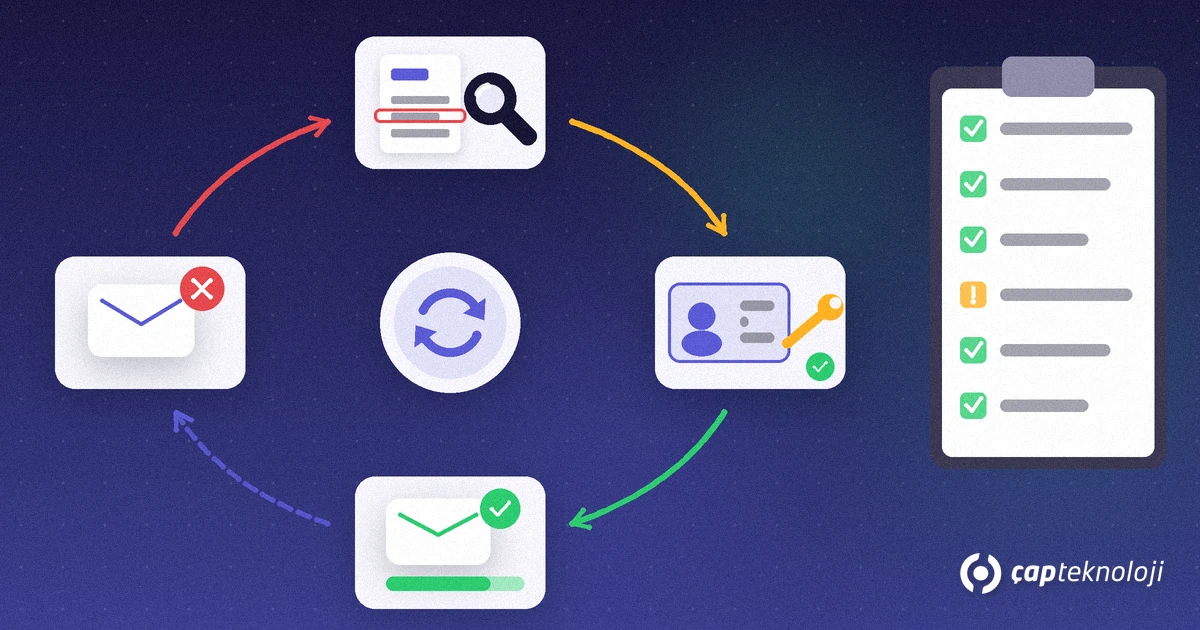
Rushing to create a new invoice when you see an error only multiplies the problem. Follow this order:
- Record the message. Note the error text, the invoice number and the time. Find out whether it came from Logo, the provider or the buyer.
- Identify the stage. If the document never reached the provider, the problem is inside Logo. If the provider rejected it, it is a content or rule problem. If the buyer rejected it, it is a commercial objection.
- Fix the source in the master data. If the customer account, unit, series or exemption code is wrong, correct that record rather than the invoice, so the error does not repeat on the next invoices.
- Check the status. Before resending, check whether the invoice has already reached GİB or the buyer. Otherwise you may end up with two documents for one transaction.
- Send it again. According to Logo’s FAQ, a failed invoice can be resent through LogoConnect.
- Handle a wrong invoice that has already arrived. Under the commercial scenario the buyer rejects it and a new invoice is issued. A basic-scenario invoice cannot be cancelled; the buyer sends you a return invoice. Confirm time limits and bookings with your accountant.
From symptom to cause: a quick diagnosis table
| Symptom | Likely cause | First check |
|---|---|---|
| The invoice never reaches the provider | Connection details, electronic seal, product version | Provider user details in Logo and certificate validity |
| The provider rejects the document | Missing tax number, unit mapping, exemption code, series | The field named in the error text; the related customer or stock card |
| The invoice is sent but the customer cannot see it | Wrong mailbox alias | The customer’s current alias |
| The customer rejects the invoice | Commercial objection: price, quantity, scenario | Compare with the order and delivery note |
| Errors only for certain products | That product’s unit or tax setup | Unit and VAT fields on the stock card |
If Logo is connected to e-commerce, field sales or banking systems, also check the data in the system where the invoice originated. We explain the general logic of integrations in our article what is ERP integration.
When to ask whom for help
Going to the right person shortens the fix:
- Your e-invoice provider: envelope and transmission errors, mailbox and portal access.
- Your Logo partner: master data structure, series setup, unit mapping, product updates and permissions. Our ERP consulting team can support you here.
- Your accountant: legal questions such as exemption codes, skipped numbers, cancellations and returns. Confirm current rules with GİB announcements and your accountant.
Do not make bulk corrections directly in the database with SQL queries. The e-invoice status fields work together with Logo’s own business rules; a field changed by hand leaves inconsistencies that are hard to trace later. If you see performance or maintenance issues on the database side, work with our SQL consulting team. If you have not yet settled which Logo product fits you, our comparison Logo Edge T-Series vs N-Series helps.
e-Invoice checklist
- Is the registered user list refreshed regularly?
- Are tax or ID number, tax office, address and mailbox alias mandatory on new customer accounts?
- Is the scenario (basic or commercial) defined per customer account?
- Are all stock units mapped to UBL-TR codes?
- Has the rule for invoice type and exemption code on zero-VAT transactions been agreed in writing with your accountant?
- Has the invoice series been updated for the new year?
- Is there a named owner and a schedule for provider connection details and the electronic seal’s validity?
- Are Logo updates and GİB announcements being followed?
For a refresher on the basics of e-transformation in Turkey, see our article e-invoice and e-ledger.
Summary
Most e-invoice errors in Logo are recurring master data problems: a wrong alias, missing tax details, an unmapped unit, a missing exemption code, an old series or outdated connection details. If you separate the error by stage, fix the source on the record and resend only after checking the status, you will not meet the same problem twice. At ÇAP Teknoloji we can review the e-invoice setup of your Logo installation with you; reach us via our contact page.
Frequently Asked Questions
Can I resend a failed e-invoice in Logo?
Yes. According to Logo’s FAQ, a failed invoice can be resent through LogoConnect. Before resending, fix the cause on the customer account, stock unit or series setup and check whether the invoice has already reached GİB.
Can I send an e-Fatura to a customer who is not registered?
No. e-Fatura is a closed system and is only sent to registered users. Customers who are not registered receive an e-Archive invoice. Keeping the registered user list in Logo up to date prevents this error.
Which code should I choose on an invoice with zero VAT?
According to Logo’s e-invoice FAQ, an exempt invoice uses the type İSTİSNA with the matching exemption code, while a zero-VAT invoice that is not an exemption uses the type SATIŞ with code 351. Agree the right code for your transaction with your accountant.
How do I correct a wrong e-invoice sent under the basic scenario?
A basic-scenario e-invoice cannot be cancelled. According to Logo’s FAQ, the buyer issues a return invoice against it and sends it to you. Confirm time limits and bookings with your accountant.
What is the most effective way to prevent e-invoice errors?
Keep master data right at the source: make tax number, address and mailbox alias mandatory on customer accounts, map every stock unit to its UBL-TR code and check the invoice series every year. Most errors come from these fields.
