


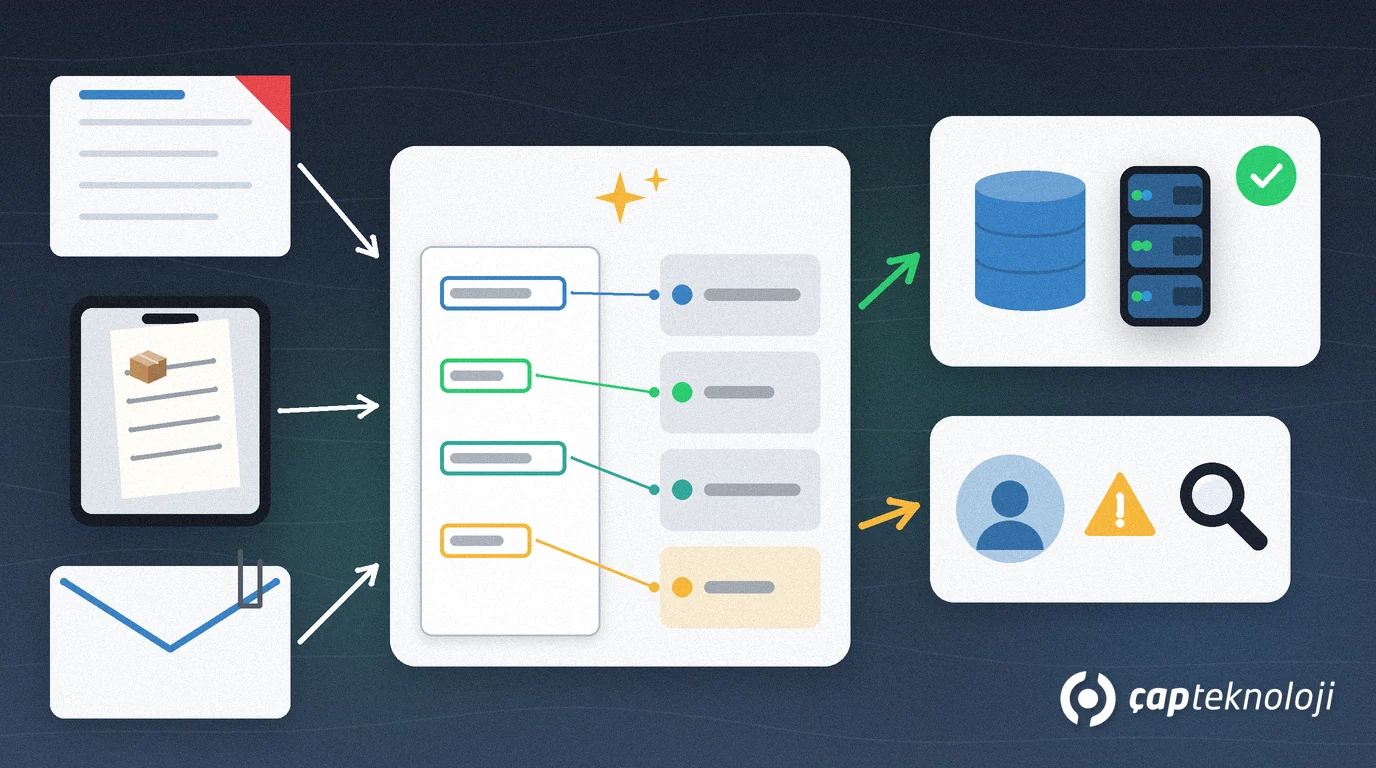
In short: AI document processing reads invoices, delivery notes and purchase orders that arrive as PDFs, scans or photos, turns supplier, date, amount and line items into structured data, and compares that data with the order and goods receipt in your ERP to prepare a posting proposal. The AI never posts on its own: fields it is unsure about and amounts that do not match always go to someone in accounts for approval.
As e-invoicing spreads, it is easy to assume that invoice entry is “already automated”. Yet in many small and mid-sized companies the accounts team still types PDF invoices, paper delivery notes and order forms received by email into the ERP at month end. This guide explains which documents AI-assisted processing makes sense for, how to set it up step by step and how to keep data protection and control risks in check.
Contents
- What is AI document processing?
- Which documents is it for?
- Setting it up in 6 steps
- Matching invoice, order and delivery note
- Data protection, security and human review
- How to measure the benefit
- Summary and checklist
What is AI document processing?
Document processing means reading the information on a document, splitting it into the right fields and passing it to a system as a record. Classic OCR (optical character recognition) only extracts the text from an image; to know which number is the invoice total and which is the tax ID, you need a template for each supplier’s layout. AI-assisted tools interpret the text together with the layout and try to find the fields across different formats.
For example, according to Microsoft’s documentation, the Document Intelligence invoice model extracts fields such as customer name, billing address, due date, amount due and line items from phone-captured images, scanned documents and digital PDFs and returns them as structured JSON. Other products and language-model-based solutions do similar work; choose based on your document types and on where the data may be processed.
Which documents is it for, and how does it differ from e-invoicing?
Structured e-invoices, such as Turkey’s e-Fatura in UBL-TR XML format, already arrive as data. There is nothing for AI to read; the right approach is to import them into the ERP through an integration. We cover the basics in e-invoice and e-ledger. AI adds value for documents without structured data:
| Document | Usually arrives as | Suitable approach |
|---|---|---|
| Structured e-invoice | XML plus a rendered copy | Direct ERP integration |
| Foreign supplier invoice | PDF, email attachment | AI field extraction with human review |
| Paper delivery note | Scan or phone photo | AI reading, matched to the order |
| Customer order form | PDF or Excel, email attachment | AI line-item extraction, sales approval |
| Expense receipts | Photo | AI reading, expense policy check |
Documents often land in shared inboxes. If you want to sort messages by type first, our guide to AI email triage covers that first step of the flow.
How to set up AI document processing in 6 steps
1. Pick one document type and a field list
Start with a single document type, for example foreign supplier invoices. List the fields the ERP needs: supplier, document number, date, currency, subtotal, tax, total, order number and line items.
2. Build a sample set from real documents
Choose documents from different suppliers and of different quality: clean PDFs, skewed scans, shadowy photos. Have someone record the correct values for each document separately; you will use this set to choose a tool and to measure accuracy after go-live.
3. Configure reading and field extraction
The tool reads the document and fills the fields. If it provides a confidence score per field, decide below which score a field goes to review. Check separately, with simple rules, whether the amounts add up (line items, tax and total).
4. Validate against ERP data
Compare the supplier with the supplier master record, the order number with open purchase orders and the line items with the goods receipt. The next section covers this step in detail.
5. Set up a human review queue
Low-confidence fields, mismatched amounts, new suppliers and documents with changed bank details should land in a review queue. The reviewer needs to see the document image and the extracted fields side by side and be able to correct them, and corrections should be logged.
6. Run in suggestion mode first, then expand
In the first weeks, let the system only prepare posting proposals while people still post manually. Compare proposals with the actual postings to see which fields get corrected most; when the results are good enough, move on to the next document type.
How do you match invoice, purchase order and delivery note?
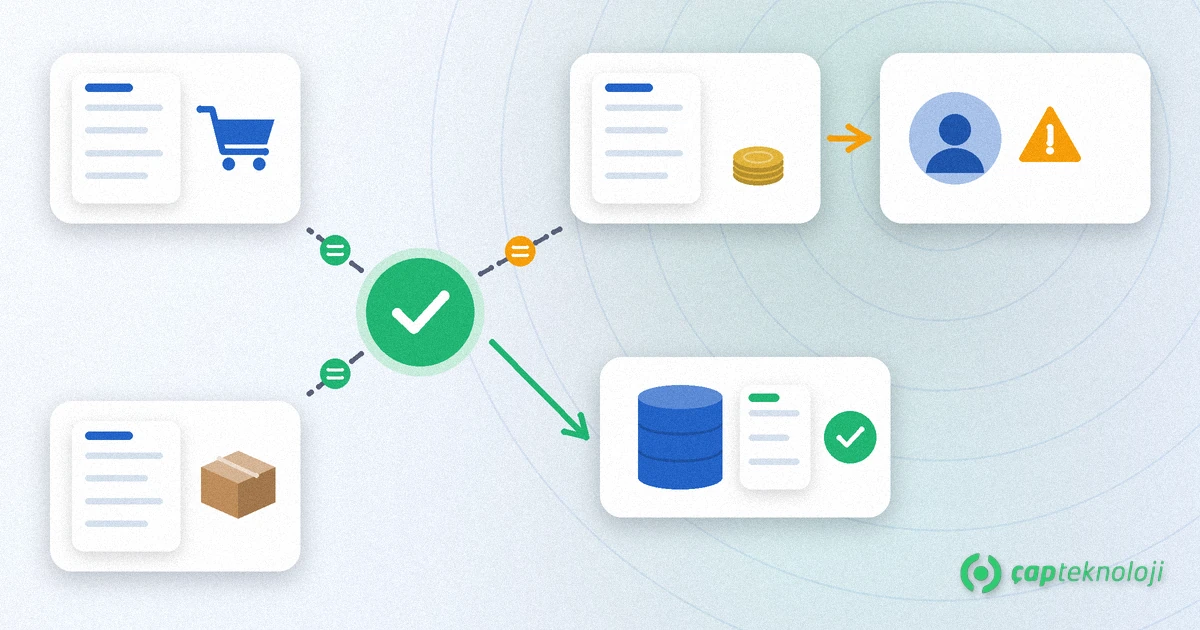
Three-way matching compares the quantity and price on a supplier invoice with the purchase order and with the goods actually received (delivery note or goods receipt). The AI does not do this comparison; it only prepares the data read from the document. The comparison should run on ERP records with clear rules:
- Supplier and order: can the invoice be linked to an open order for that supplier?
- Quantity: does the invoiced quantity exceed the quantity received?
- Price: is the unit price the same as on the order, or within the tolerance your company has set?
- Totals: do line items, tax and total add up?
If all three documents agree, the posting proposal is ready; if there is even one mismatch, the document goes to human review with the difference highlighted. Whether you build the rules inside the ERP or in a separate integration layer depends on what your ERP offers.
Data protection, security and human review: what to watch
- Personal data: expense receipts and some invoices contain employee or customer data. Define which data is processed for which purpose and check privacy notices and data processing agreements under KVKK or GDPR.
- Where data is processed: if you use a cloud tool, confirm in the contract in which region documents are processed, whether they are stored and for how long.
- Changed bank details: if the IBAN on an invoice differs from the supplier master record, the document must never move on automatically. We cover fake invoices and bank detail fraud in business email compromise (BEC).
- Posting and payment rights: the AI proposes; approving the posting and releasing payment stay with a person.
- Audit trail: keep the extracted values, the corrections and the approver for every document; auditors will ask for it.
How do you measure the benefit?
Measure the benefit with your own data, not with claims. Before you start, record these values for the chosen document type: average handling time per document, number of documents waiting at month end, number of postings corrected later and invoices paid late. Repeat the same measurements in suggestion mode and after go-live. If the numbers do not improve, the problem is often not the tool but document quality or missing master data in the ERP (supplier records, item codes).
Summary and checklist
- Have you listed the document types that are not e-invoices and are still typed in by hand?
- Are the first document type, its field list and a sample set from real documents ready?
- Are confidence thresholds, amount checks and ERP matching rules written down?
- Is human review defined for mismatches and changed bank details?
- Have data protection, processing location and retention been checked?
- Have baseline measurements been recorded?
In short, AI document processing removes manual typing for documents that are not e-invoices while leaving control with the accounts team. At ÇAP Teknoloji we can set up this flow with you, from choosing the document type to ERP matching rules and data protection checks, as part of our AI workflow automation service; contact us to get started.
Frequently Asked Questions
Do we need AI document processing if we already use e-invoicing?
Structured e-invoices arrive as XML data and should be imported into the ERP through an integration. AI helps with documents that have no structured data, such as foreign supplier invoices, paper delivery notes, PDF order forms and expense receipts.
Can the AI post invoices to the ledger by itself?
Technically it could be connected that way, but it is not recommended. The AI should read the fields and prepare a posting proposal; approving the posting and releasing payment should stay with an employee. Mismatches and changed bank details must always go to human review.
What is the difference between classic OCR and AI document processing?
Classic OCR extracts the text from an image and needs a template per document layout to find the fields. AI-assisted tools interpret the text together with the layout and try to find the fields across different formats. The results still need to be checked with rules and against ERP data.
Which document type should we start with?
Start with the type that takes the most manual entry time, comes from a manageable number of suppliers and has an order in the ERP to compare against, for example foreign supplier invoices. Try it in suggestion mode, measure the results, then expand.
Are cloud tools for document processing compliant with data protection rules?
That depends on where the tool processes data, whether it stores it and on the contract terms. Before using one, check the processing location, retention period and data processing agreement, and ask your legal adviser if needed.