


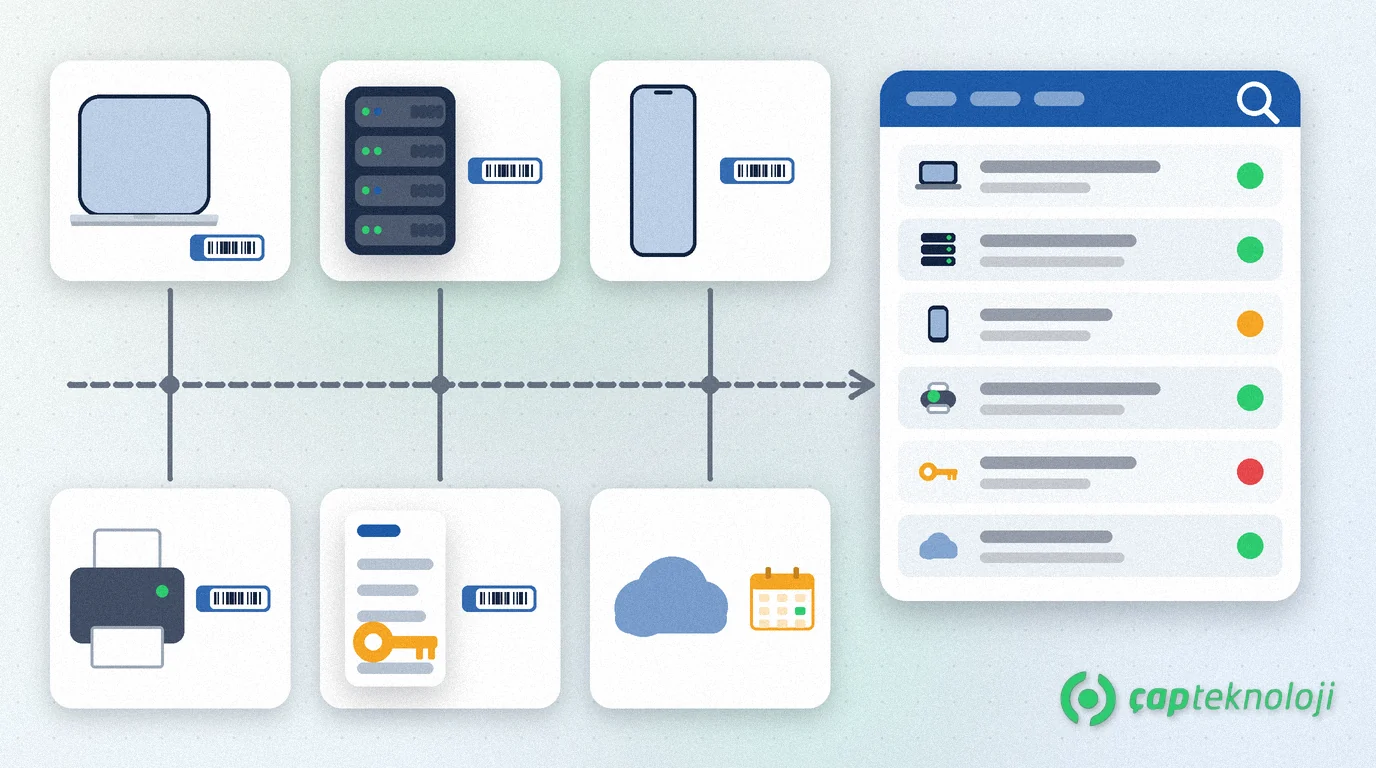
In short: IT asset management means keeping all of a company’s hardware, software licences and cloud subscriptions in one up-to-date inventory, together with who has each item, where it runs and when its warranty or renewal ends. A well-kept register exposes devices that are out of support, licences nobody uses and the laptop still sitting with an employee who has left.
In many small and mid-sized companies, device information lives in three places: the fixed asset list in accounting, the IT person’s own spreadsheet and supplier invoices. When these records disagree, even “How many laptops do we have, and who has them?” goes unanswered. This guide shows how to build the inventory from scratch, keep it current and connect it to your other IT processes.
Contents
- What is IT asset management?
- What belongs in the register?
- The six lifecycle stages
- Building the inventory in 7 steps
- Spreadsheet or ITAM tool?
- Common mistakes
- Summary and checklist
What is IT asset management?
IT asset management (ITAM) is the process of recording and managing a company’s IT assets from the moment they are bought until they are disposed of.
It is not the same as the fixed asset register in accounting. The accounting record tracks cost and depreciation; the IT inventory shows who uses a device, which operating system it runs, what software is installed and when support ends. The U.S. National Institute of Standards and Technology puts the difference clearly in its NIST SP 1800-5 IT asset management guide: a physical asset system can tell you where a computer is, but not which operating systems your laptops run or which devices are vulnerable to the latest threat. Effective IT asset management ties physical and virtual assets together and shows what is used, where and how.
Which assets and details belong in the IT inventory?
It is tempting to keep the scope narrow, but counting computers alone is not enough. Bring these asset groups into one list:
- End-user devices: desktops and laptops, tablets, company phones, handheld terminals.
- Infrastructure: servers, storage, firewall, switches, wireless access points, UPS units.
- Peripherals: network printers, scanners, label and receipt printers.
- Software licences: operating systems, office software, ERP and database licences, security software.
- Cloud subscriptions: email, file sharing, backup and other services billed per user.
Core fields for every record:
| Field | Example | Why it matters |
|---|---|---|
| Asset number (tag) | Barcode label on the device | Links the device to its record |
| Type, make, model, serial no. | Laptop, manufacturer, model, serial number | Warranty claims and repairs |
| User and department | Sales, finance, warehouse | Accountability and return on leaving |
| Location | Head office, branch, server room | Audits and on-site support |
| Operating system and version | Installed version and last update | Finding unsupported systems |
| Purchase and warranty | Invoice date, supplier, warranty end | Replacement plan and budget |
| Licence and subscription | Licence type, quantity, renewal date | Spotting shortfalls and surplus |
| Status | In use, in stock, faulty, disposed | Separating lost and idle devices |
The IT asset lifecycle: six stages from purchase to disposal
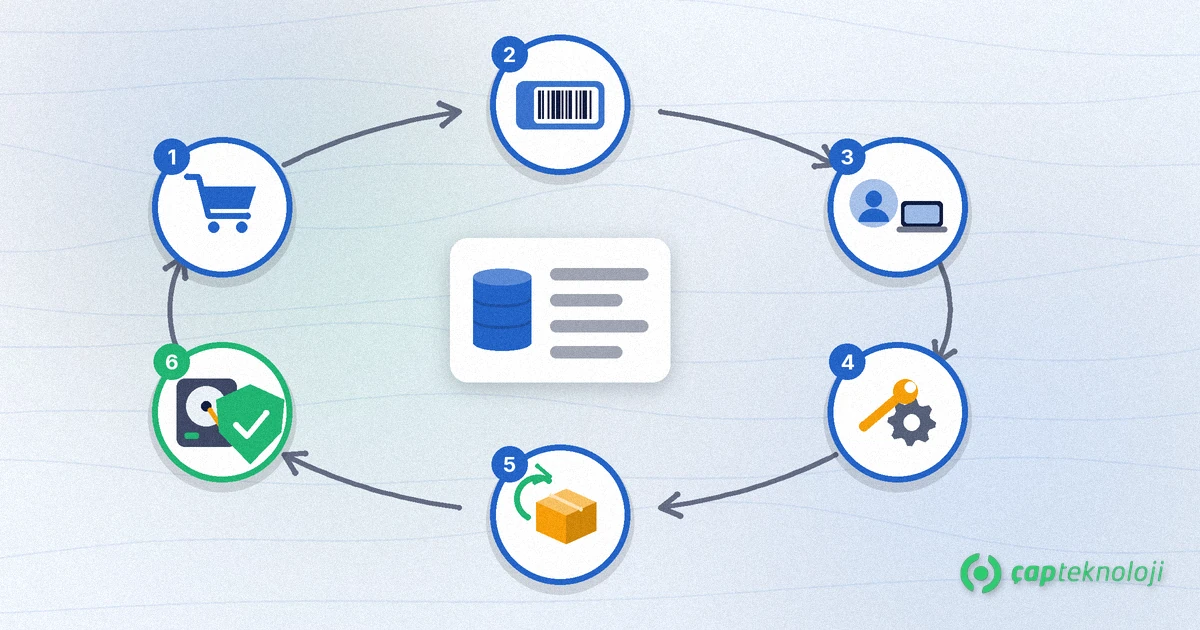
An inventory is not a list you fill in once. Every asset passes through these stages, and the record should change at each step:
- Purchase: need, standard model and budget approval. Replacements planned around warranty end dates also feed your IT budget.
- Tagging and registration: the device is labelled on delivery and recorded before anyone uses it.
- Assignment: the device goes to a user or department, and the handover form is linked to the record.
- Maintenance and updates: faults, part replacements and updates are logged. Knowing which version runs on which device is a precondition for patch management.
- Return and reuse: when someone leaves or a device is replaced, it is returned, checked and reissued. This step is part of IT offboarding when an employee leaves.
- Secure disposal: data on a device at the end of its life is wiped so it cannot be recovered, the disk is physically destroyed if needed, and the record is closed as “disposed”. For devices holding personal data, also consider your obligations under data protection law (in Turkey, the KVKK).
How do you build an IT asset inventory in 7 steps?
1. Define the scope and the owner
Write down which asset groups are in scope and who keeps the record up to date. There should be one owner; purchasing, HR and department heads feed information to that person.
2. Take stock from more than one source
One source is never enough. List devices on the network with a discovery tool, do a physical count in the office and warehouse, and check recent purchase invoices and vendors’ licence portals. The gaps between sources are usually the most valuable findings: a device on an invoice that cannot be found, or a computer on the network with no record.
3. Give every device a permanent asset number
Stick a barcode or numbered label on the device and use the same number in the record. A serial number alone is not enough; it is often on the underside and hard to read.
4. Choose a single place for the record
Keep the inventory in one place. Scattered files drift apart quickly. The comparison below helps you choose the right tool.
5. Match licences and subscriptions to installations
Compare the number of licences bought with the number actually installed or assigned. A shortfall is a legal risk; a surplus is wasted money. Cloud subscriptions still assigned to former employees are easy to miss.
6. Connect the inventory to other processes
An inventory stays current only if updates are tied to events: device assignment at onboarding, return at offboarding, tagging at purchase, a service entry when something breaks. None of these tasks should count as finished until the record is updated.
7. Verify regularly
Depending on company size, compare the record with a network scan and a sample physical count every three or six months. Once a year, review warranty and licence renewal dates and update the replacement plan.
Spreadsheet or IT asset management tool?
A small office can start with a well-designed spreadsheet. As the number of devices and sites grows, a tool with automatic discovery starts to make more sense.
| Criterion | Shared spreadsheet | ITAM tool with discovery |
|---|---|---|
| Getting started | Fast, no extra cost | Needs setup and agent rollout |
| Accuracy over time | Depends on manual entry | Device data is collected automatically at intervals |
| Installed software | Hardly feasible | Can be listed per device |
| Change history | Limited | Assignment and status history is kept |
| Best suited to | Few devices, one site | Several sites, frequent device and staff changes |
Whichever you choose, the fields and process links above stay the same. A tool supports the process; it does not replace it.
Common mistakes
- Counting once and stopping: an inventory that is not tied to processes goes stale within months.
- Counting only computers: network devices, printers and cloud subscriptions are left out.
- No clear owner: a record that is “everyone’s job” ends up being nobody’s.
- Returns not recorded: a device and account left with a former employee is both a cost and a security gap.
- Disposal not documented: a disk discarded without wiping is the easiest data leak to prevent.
Summary and checklist
IT asset management keeps hardware, licences and subscriptions in one inventory that stays current throughout their lifecycle. A short checklist:
- Have you defined the scope and a single owner?
- Have you compared a network scan, a physical count and invoices?
- Does every device carry a tag that matches the inventory?
- Do licence and subscription counts match installations?
- Are onboarding, offboarding, purchasing and disposal tied to the inventory?
- Are regular checks and a yearly renewal review in the calendar?
At ÇAP Teknoloji we help define the inventory scope, take stock of the current state and connect the inventory to your IT processes. See our Management Consulting page for details or get in touch with us.
Frequently Asked Questions
Is IT asset management the same as a fixed asset register?
No. The fixed asset register in accounting tracks cost and depreciation. IT asset management tracks who uses a device, which operating system and software are installed, and when warranties and licences need renewing. If both records share the same asset number, they can be used to check each other.
Is a spreadsheet enough for a small company?
A company with few devices at a single site can start with a well-designed spreadsheet. What matters is one file, one owner and updating the record at onboarding, offboarding and purchase. As devices and sites grow, consider a tool with automatic discovery.
How often should the IT inventory be updated?
The record should change with every event: a new device, an assignment, a return, a fault or a disposal. In addition, verify it with a network scan and a sample count every three or six months depending on company size, and review warranty and licence renewals once a year.
Should cloud subscriptions be in the inventory?
Yes. Per-user email, file sharing or backup subscriptions are company assets too. Subscriptions still assigned to former employees create both unnecessary cost and an access risk, so track them alongside your licences.