


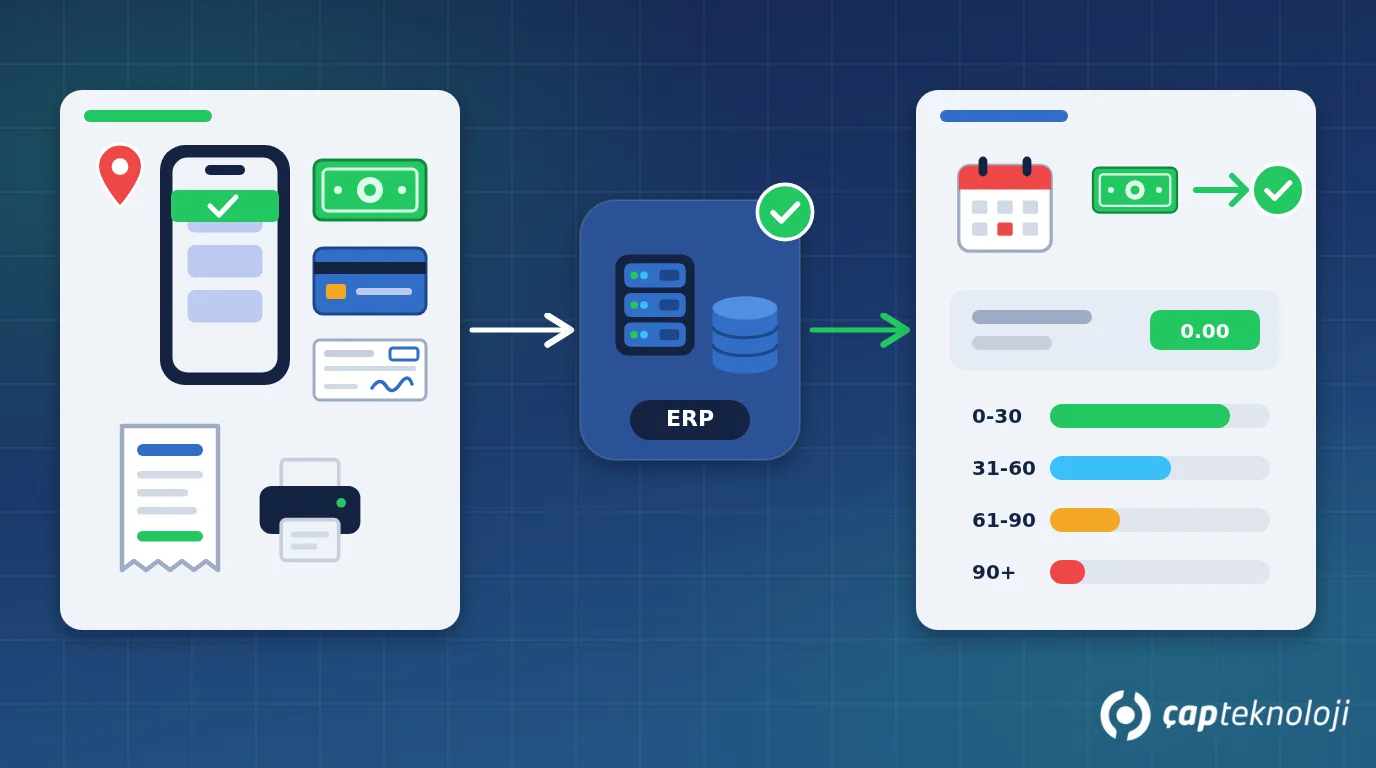
In short: Field payment collection is the process of recording cash, card, cheque or bank transfer promises that a sales rep receives at the customer’s premises, and posting them to the customer account right away. Paper receipt books and batch entries in the evening lead to late postings, wrong balances and cash differences. A routine that starts with a list of receivables due, documents every payment with a receipt, syncs it to the ERP immediately and closes with an end-of-day reconciliation removes most of these problems.
For SMEs with a field sales team, collecting payments is often harder to manage than selling. A rep visits fifteen shops in a day, gets cash from three, a cheque from one and a “I’ll transfer it tomorrow” from another. Notes go into a paper receipt book, accounting hears about it by phone in the evening, or someone types it into Excel the next morning. Meanwhile the customer believes the invoice is paid, accounting still sees it open, and on the next visit the rep asks for the same money again. At month end, the cash count does not match. This article explains how to organise field collections, what to record for each payment method and which risks to watch.
Contents
- What is field collection and why manage it separately?
- Which payment methods are used in the field?
- A 5-step routine for field collections
- Cash, cheque and data security risks
- Summary and checklist
- Frequently asked questions
What is field payment collection and why manage it as its own process?
Field collection means that a sales rep or a dedicated collector picks up payments from customers who buy on credit terms, directly at the customer’s shop or office. In distribution businesses that sell through dealers and retailers, such as food, beverages, cleaning products, building materials or pharmaceuticals, most revenue runs on open accounts. The speed and accuracy of collections therefore shape cash flow directly.
There are three reasons to treat collection as a process separate from selling. First, money and negotiable instruments change hands, and every gap between the record and the physical asset is a potential cash difference or an opportunity for misuse. Second, the customer’s current balance drives other decisions in the field: credit limit checks and order approvals give the wrong answer when the balance is wrong. Third, customer relationships suffer; being chased for an invoice that is already paid annoys even your best customers.
Which payment methods are used in the field?
Each method needs different data on record and carries its own risk. Decide first which methods you accept:
| Method | What the record must contain | Main risk | What to watch |
|---|---|---|---|
| Cash | Amount, currency, date and time, customer, sales rep | Loss, theft, cash differences | A cash-carrying limit per rep and same-day handover |
| Credit card (mobile POS or payment link) | Amount, authorisation code, transaction reference, instalments | Double charges, a cancelled transaction counted as paid | Card numbers are never kept in the app or on paper; only the transaction reference is stored |
| Cheque or promissory note | Cheque number, bank and branch, drawer, due date, amount, photo of front and back | Bounced cheque, loss, wrong due date | Check that the drawer and endorsements match the customer account |
| Bank transfer promise | Promised amount and date | The promise being posted as a payment | Tracked as an “expected payment” until the bank transaction arrives; the balance is not reduced |
The last row matters most. “I’ll pay tomorrow” is a promise, not a payment. If the system does not keep it as a separate status, both the customer balance and the rep’s performance report will be wrong.
How to organise field collections in 5 steps
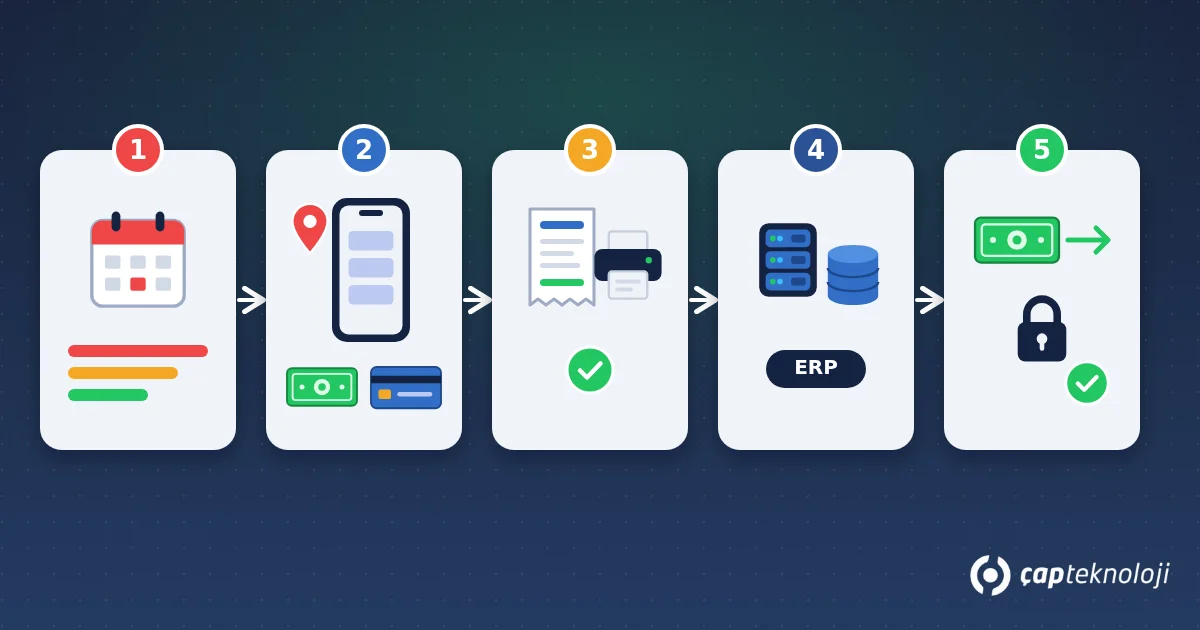
1. Start the day with a list of receivables due
Before each visit, the rep should see the customer’s current balance, the overdue amount and what falls due this week. When the list is grouped into ageing buckets (0-30, 31-60, 61-90 and over 90 days), priorities become obvious. The list should come automatically from the customer accounts in the ERP, not from a spreadsheet prepared by hand each morning.
2. Record the payment at the customer’s premises
Enter the method, the amount and the relevant details in the mobile app the moment you receive the payment; photograph the cheque and add the card transaction reference. If location and time are attached automatically, you can also see that the payment was really collected during the visit. In areas without mobile coverage the app must work offline, keeping the record on the device and syncing it once a connection is available.
3. Give the customer a receipt
The customer should receive proof of payment on the spot. A receipt printed on a Bluetooth printer, or a digital receipt sent by e-mail or message, can replace the handwritten receipt book. It should show a sequence number, date, amount, method and the remaining balance. Agree with your accountant which document type to use and what legal status it has in your country.
4. Sync the record to the ERP immediately
The payment must be posted to the right cash, bank or cheque portfolio account and to the right customer in the ERP. If you use an ERP such as Logo or Mikro (widely used business software in Turkey), an integration with the field sales app means accounting does not re-enter the same data. Customer service, finance and the rep making the next visit all see the same balance.
5. Hand over cash and reconcile at the end of the day
Each rep compares the collection summary in the system with the cash and cheques handed over, and the person receiving them confirms it. Card payments are matched against the bank or payment provider report, and transfer promises against bank transactions. Any difference is explained the same day; once reconciliation slips to the next week, finding the cause becomes very difficult.
Cash, cheques and data security: risks and data protection
Field collection risks are both physical and digital. The following measures are realistic for most SMEs:
- Permissions and limits: Limit the rep’s authority to grant discounts, cancel payments or change due dates. Cancellations and corrections should be logged with a reason and require a second person’s approval.
- Cash security: Set an upper limit for cash carried and a rule for depositing it at the bank or handing it over during the day.
- Card data: Card numbers, expiry dates and security codes are never written down, photographed or stored in the app. Card payments go only through an authorised POS or payment provider.
- Device security: Field devices need a screen lock and remote wipe. A lost device and the account of a departing employee are disabled the same day.
- Data protection (KVKK/GDPR): Collection records, cheque photos, signatures and location data may contain personal data. In Turkey this falls under KVKK, the Turkish personal data protection law, and in the EU under the GDPR. Collect only what you need, restrict access by role, define retention periods and inform employees clearly about location tracking. Review the details with your legal adviser.
Summary and checklist
- Write down the payment methods you accept and the mandatory fields for each one.
- Reps start the day with an ERP-generated list of receivables grouped by ageing bucket.
- Payments are recorded at the customer with location and time, and the customer receives a receipt.
- Bank transfer promises are tracked as expected payments, not as collections.
- Records sync to the ERP instantly so accounting does not re-enter data.
- Cash handover and reconciliation happen the same day, and differences are documented.
- Cancellation rights, cash limits, card data handling and data protection rules are defined.
Most of these steps happen naturally once you use a field sales app that is integrated with your ERP. ÇAP Teknoloji’s S-Leader field sales app brings orders, invoices and collections into one screen, integrates with Logo and Mikro and shows overdue receivables in a single report. If you would like to review your current collection process together, get in touch with our team.
Frequently asked questions
What happens if a rep enters a payment the next day?
The balance is wrong for a full day. In that time customer service may give wrong information, a credit limit check may block an order unnecessarily, and the payment is more likely to be forgotten or posted to the wrong account. Recording it at the moment of payment removes these risks.
How should a cheque collected in the field be recorded?
Enter the cheque number, bank and branch, drawer, due date and amount, and attach photos of the front and back. In the ERP the cheque goes into the cheque portfolio and is tracked there until it matures. The physical cheque is handed over at the end of the day and checked against the record.
How should partial payments be handled?
A partial payment is recorded for the amount paid, with a note of which invoices or due dates it settles. Settling the oldest items first is the usual choice. The remaining amount and any new payment promise should stay in the system as a note for the next visit.
Do we need a separate app for field collections?
Keeping collections in a separate app with no link to the ERP creates another data island. The better option is to handle orders, invoices and collections in the same field sales app, integrated with the ERP. The rep uses one screen and accounting works from one source.